Configure UFW: A Practical Guide
Table of Contents
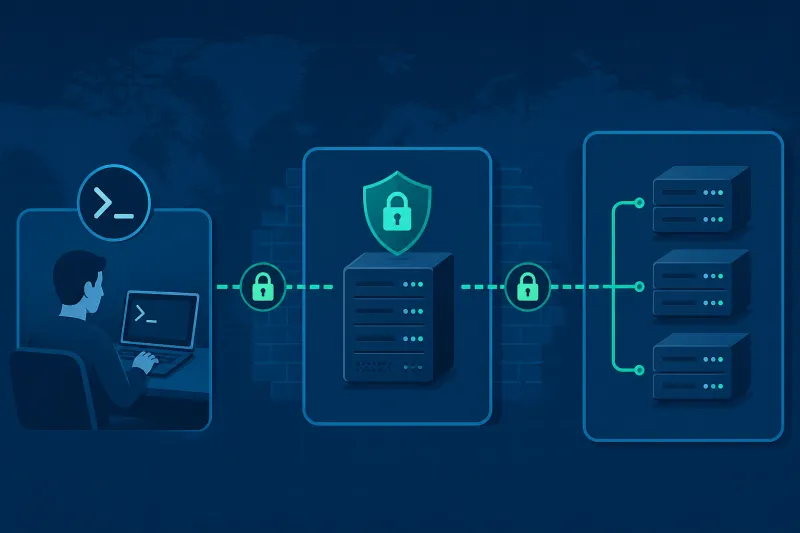
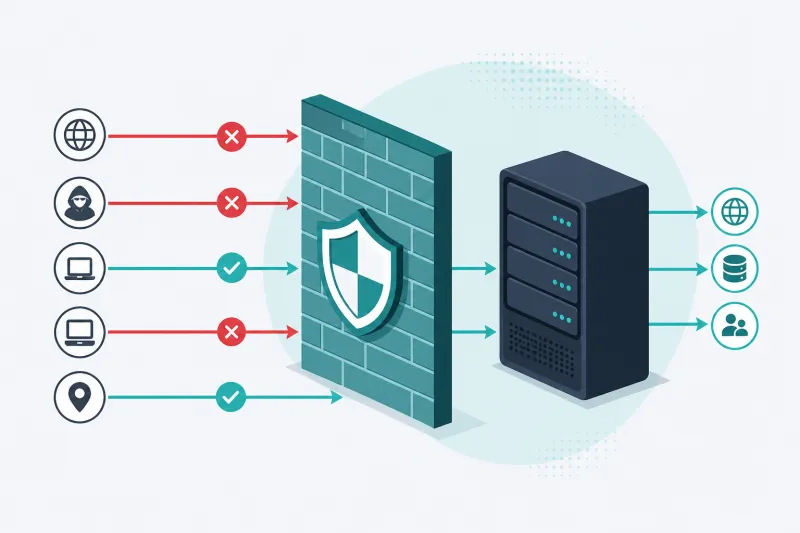
UFW (Uncomplicated Firewall) is the default firewall frontend on Ubuntu Server. It wraps nftables with a small command set: default policies, allow/deny rules, and simple application profiles. For a VPS running SSH and WireGuard, UFW is enough—if you configure it in a safe order and keep it aligned with your cloud provider’s firewall.
This guide configures UFW on Ubuntu 22.04/24.04 for a typical VPN host: deny inbound by default, allow SSH, allow WireGuard UDP, enable logging thoughtfully, and avoid the lockout patterns that send people to the provider console.
You should already have SSH key access. Keep a second session open whenever you enable or reload rules that affect port 22.
What You'll Learn
- UFW defaults and how they interact with nftables
- A lockout-safe enable sequence
- Rules for SSH, WireGuard, and optional admin restrictions
- Rate limiting, numbering, deletion, and reload behavior
- Forwarding policy for VPN egress hosts
- How UFW relates to DigitalOcean Cloud Firewalls
UFW Mental Model
UFW manages:
- Default policies for incoming, outgoing, and routed (forward) traffic
- Rules evaluated in order (first match wins for many practical cases—inspect with status numbered)
- IPv4 and IPv6 in parallel when
IPV6=yes
Check current state:
sudo ufw status verbose
sudo ufw status numbered
Inactive UFW means the host relies on provider firewalls or nothing at all. Active with empty allows and default deny incoming will drop SSH unless you allow it first.
Safe First-Time Setup
sudo apt update
sudo apt install -y ufw
Set defaults before enabling:
sudo ufw default deny incoming
sudo ufw default allow outgoing
sudo ufw default deny routed
Allow SSH before ufw enable:
sudo ufw allow OpenSSH
# equivalent: sudo ufw allow 22/tcp
Enable:
sudo ufw enable
sudo ufw status verbose
Confirm your current SSH session still works. Only then add application ports.
Application Profiles
List profiles:
sudo ufw app list
sudo ufw app info OpenSSH
Profiles live under /etc/ufw/applications.d/. Using OpenSSH instead of raw 22/tcp keeps intent readable.
Allow WireGuard UDP
sudo ufw allow 51820/udp comment 'WireGuard'
sudo ufw status numbered
Comments help future you. If you change ListenPort in WireGuard, update UFW in the same change window.
Restrict SSH by Source IP (Strongly Recommended When Practical)
If your admin IP is stable:
sudo ufw delete allow OpenSSH
sudo ufw allow from 203.0.113.10 to any port 22 proto tcp comment 'Admin SSH'
Use your real IP. For a small team, allow multiple /32s or a narrow office CIDR. If you roam on unpredictable networks, skip source restrictions at UFW and prefer keys + Fail2Ban, or use a VPN jump path once WireGuard is up—but do not remove all SSH access before an alternate path exists.
Rate Limiting SSH
UFW can limit connection attempts:
sudo ufw limit OpenSSH
This helps against naive brute force. It is not a substitute for disabling password authentication. Combine with key-only SSH and Fail2Ban for defense in depth.
Insert and Delete Rules Precisely
Numbered status:
sudo ufw status numbered
Delete by number:
sudo ufw delete 3
Insert at a position when order matters:
sudo ufw insert 1 allow from 203.0.113.10 to any port 22 proto tcp
Reload after batch edits if needed:
sudo ufw reload
IPv6
Ensure /etc/default/ufw contains:
IPV6=yes
Then reload. Rules you add generally apply to both stacks. If the VPS has IPv6 and IPV6=no, you may leave IPv6 wide open relative to your IPv4 policy—a common oversight.
Logging
sudo ufw logging on
# or: low | medium | high | full
sudo ufw logging low
Logs typically appear via the kernel/netfilter path in /var/log/ufw.log or the journal. High logging on a busy VPN node can be noisy; start with low or on.
Forwarding Policy for VPN Gateways
WireGuard servers that NAT client traffic need forwarded packets allowed.
Check:
grep DEFAULT_FORWARD_POLICY /etc/default/ufw
Options:
- Set
DEFAULT_FORWARD_POLICY="ACCEPT"on a dedicated VPN VPS, thensudo ufw reload - Keep
DROPand add explicit route rules (more precise, more work)
Example explicit approach (interface names vary):
sudo ufw route allow in on wg0 out on eth0
Also enable sysctl forwarding (net.ipv4.ip_forward=1). UFW policy alone does not turn your host into a router.
Before/After Rules and Custom Files
Advanced users edit:
/etc/ufw/before.rules/etc/ufw/after.rules/etc/ufw/before6.rules/etc/ufw/after6.rules
Use these for NAT MASQUERADE tied to UFW lifecycle, or for rules UFW’s CLI cannot express cleanly. Back up before editing. Syntax errors can break firewall application on reload.
Example NAT snippet often placed in before.rules inside the *nat table section (adapt interface and subnet):
-A POSTROUTING -s 10.66.66.0/24 -o eth0 -j MASQUERADE
Many operators still put MASQUERADE in WireGuard PostUp instead. Pick one place so you do not double-apply or forget deletions on PostDown.
DigitalOcean Cloud Firewalls vs UFW
| Layer | Role |
|---|---|
| Cloud Firewall | Filters before traffic reaches the Droplet |
| UFW | Filters on the host |
Both must allow WireGuard UDP and SSH (as designed). Cloud Firewall is ideal for admin-IP restrictions that survive OS rebuilds if reattached. UFW remains critical for defense if an instance is moved or rules drift.
Resetting UFW
Nuclear option:
sudo ufw reset
This disables UFW and clears rules. Immediately re-allow SSH before enabling again. Use when rules become untrustworthy, not as routine hygiene.
Example Final Policy for a WireGuard VPS
sudo ufw default deny incoming
sudo ufw default allow outgoing
sudo ufw allow from 203.0.113.10 to any port 22 proto tcp comment 'Admin SSH'
sudo ufw allow 51820/udp comment 'WireGuard'
sudo ufw status verbose
Outgoing default allow lets the server resolve DNS, pull apt updates, and egress NAT traffic. Tighten outbound only if you have a clear need and a test plan—outbound restrictions break surprises (NTP, API callbacks, package mirrors).
Restrict SSH to the WireGuard Subnet (Advanced)
Once WireGuard is reliable, some operators allow SSH only from tunnel addresses:
sudo ufw delete allow OpenSSH
sudo ufw allow from 10.66.66.0/24 to any port 22 proto tcp comment 'SSH via WG'
sudo ufw allow 51820/udp comment 'WireGuard'
Order of operations matters. If you remove public SSH before you have a working tunnel and a backup console path, you will need DigitalOcean Droplet Console to recover. Keep an emergency allow rule or console procedure documented. Test a full reconnect cycle: disconnect SSH, connect WireGuard, SSH to 10.66.66.1, then reboot and repeat.
Reading UFW Logs Without Drowning
With logging on, denied probes appear frequently on any public VPS. Useful checks:
sudo grep UFW /var/log/ufw.log | tail -n 40
sudo journalctl -k | grep -i ufw | tail -n 40
Look for denies on ports you thought you opened (misconfigured allow) or accepts on ports you thought you closed. Do not chase every scanner hit on ports you intentionally leave closed—that is the firewall working.
Port Ranges and Explicitness
Prefer single ports over ranges:
# prefer
sudo ufw allow 51820/udp

# avoid unless you truly need it
sudo ufw allow 50000:51000/udp
Wide ranges are hard to reason about six months later. If an application needs a range, comment why and link to the app docs in your runbook.
IPv4-Mapped Quirks and Dual Rules
When diagnosing “rule does not match,” print numbered rules and confirm whether the traffic is IPv4 or IPv6:
sudo ufw status numbered
sudo tcpdump -ni eth0 port 22
Clients on IPv6-only paths never hit your IPv4-only allowlists. Source-restricted SSH rules must include IPv6 admin addresses if you administer over IPv6.
Dry-Run Mentality for Automation
If Ansible, cloud-init, or a provisioning tool manages UFW, treat the tool as the source of truth. Manual ufw allow on a managed host creates drift that the next converge may wipe—or worse, duplicate. For TunnelFleet-managed VPN servers, prefer letting provisioning own firewall intent and only hand-edit break-glass exceptions you will remove.
Confirming Rules After Reboot
Reboot once after the initial firewall design:
sudo reboot
Then:
sudo ufw status verbose
systemctl is-active ufw
sudo iptables -S | head   # or: sudo nft list ruleset | head
ssh deploy@SERVER
UFW should still be active and SSH should work. Catching “forgot to enable” or a bad before.rules edit is cheaper before you depend on the host for production VPN users.
Best Practices
- Always allow SSH before
ufw enable - Prefer comments on every non-obvious rule
- Keep Cloud Firewall and UFW documentation in the same runbook
- Use
limitor Fail2Ban for SSH; use keys regardless - Enable IPv6 in UFW if the host has IPv6
- Change WireGuard ports and UFW rules in one maintenance step
- After
ufw reset, treat the host as unprotected until rules are restored - Review
status numberedafter automation changes
Common Mistakes
ufw enablewith no SSH allow- Allowing WireGuard on UFW but not on the DigitalOcean Cloud Firewall
- Forgetting IPv6
- Default forward DROP on a NAT VPN gateway without route allows
- Deleting the wrong numbered rule after inserts shifted indexes
- Relying on UFW alone while provider firewall denies UDP
- Opening wide TCP ranges “for debugging” and never closing them
- Editing
before.ruleswithout backup
FAQ
Is UFW enough or do I need raw nftables?
For SSH + WireGuard + a few services, UFW is enough. Drop to nftables/iptables directly when you need complex multi-zone policy UFW cannot express. Do not mix ad-hoc iptables -A rules with UFW casually—UFW reloads can surprise you.
Does UFW persist across reboot?
Yes. Enabled rules persist. Confirm with ufw status after reboot once when you first set up a host.
Why does ufw allow 51820 without /udp behave differently?
Specify 51820/udp. Omitting the protocol can create broader rules than you intend. Be explicit.
Can UFW replace Fail2Ban?
No. UFW is allow/deny policy. Fail2Ban reacts to log patterns and inserts bans dynamically. They work well together.
How do I allow ping?
sudo ufw allow proto icmp
Many operators leave ICMP allowed for diagnostics; others restrict it. Know your monitoring needs.
What if I lock myself out?
Use the provider console (DigitalOcean Droplet Console), disable UFW (ufw disable) or allow SSH from there, then fix rules. This is why console access is part of the hardening checklist.
Summary
Configure UFW with default deny incoming, allow SSH first, enable carefully, then open only required ports such as WireGuard UDP 51820. Keep IPv6 in mind, set forwarding policy deliberately on VPN gateways, and align host rules with DigitalOcean Cloud Firewalls.
A short, commented rule list you understand beats a long rule set nobody owns.
If you want to automate VPN server deployment instead of configuring everything manually, TunnelFleet helps you provision and manage VPN infrastructure on your own cloud provider with minimal manual setup.
Share this article
Practical guides on VPN infrastructure, server automation, and self-hosted networking from the TunnelFleet team.
View all articles by TunnelFleet Editorial →