Enable IPv6 on Your VPS
Table of Contents
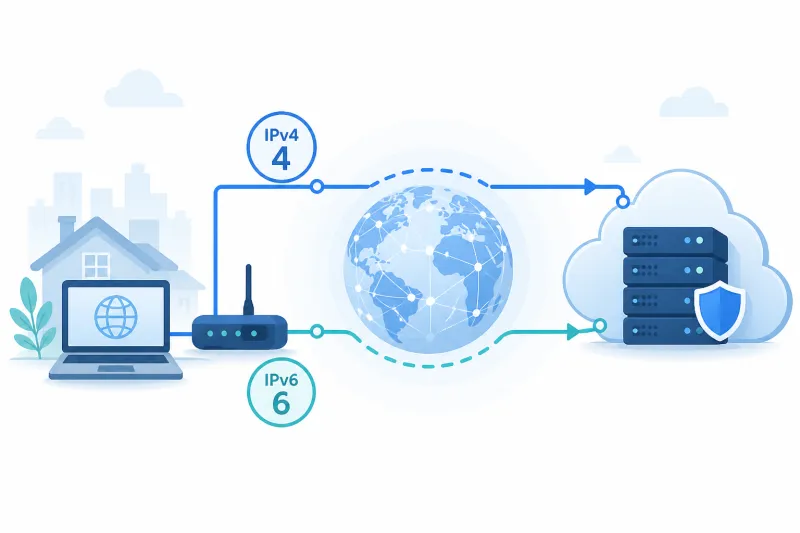
IPv6 is no longer optional infrastructure trivia. Many networks prefer it, some mobile paths are IPv6-first, and dual-stack VPS hosts that only firewall IPv4 leave an entire address family unmanaged. Enabling IPv6 on your VPS—and verifying it end to end—is a practical networking task, not a science project.
This guide covers Ubuntu 22.04/24.04 on a typical cloud VPS with DigitalOcean as the concrete provider example. You will enable or verify IPv6, confirm addresses, open firewall rules on both stacks, publish AAAA DNS when needed, and note how WireGuard dual-stack tunnels fit in.
If your Droplet was created without IPv6, enabling it may require networking changes in the control panel or a rebuild—plan for that before you promise dual-stack clients.
What You'll Learn
- How to check whether IPv6 is already active on Ubuntu
- How DigitalOcean IPv6 networking typically appears on a Droplet
- Sysctl and interface verification commands
- UFW dual-stack configuration
- AAAA records and client testing
- WireGuard considerations for IPv6 tunnel traffic
Why Enable IPv6
- Reach users and networks that prefer IPv6 paths
- Avoid “IPv4-only brain” security gaps (open IPv6 while IPv4 is locked down)
- Prepare VPN endpoints for dual-stack clients and AllowedIPs that include
::/0 - Align with modern DNS (AAAA alongside A)
You do not need IPv6 for WireGuard to work. You need IPv6 if you claim dual-stack or if the host has IPv6 addresses that must be firewalled.
Check Current State
ip -6 addr show
ip -6 route show
curl -6 -s https://ifconfig.co && echo
ping -6 -c 3 2606:4700:4700::1111
Interpretation:
- Global
inet6addresses (not justfe80::link-local) mean the host has public or provider IPv6 - Missing default via for IPv6 means you are not routed
curl -6failure with workingcurl -4means broken or absent IPv6 egress
Also check:
cat /proc/sys/net/ipv6/conf/all/disable_ipv6
0 means IPv6 is not globally disabled.
DigitalOcean: Enable IPv6 on a Droplet
When creating a Droplet, enable IPv6 in the networking options. Prefer enabling at creation.
For an existing Droplet:
- In the DigitalOcean control panel, open the Droplet → Networking
- Enable IPv6 if the UI offers it for that Droplet
- Reboot if the panel instructs you to
- Confirm addresses with
ip -6 addr
DigitalOcean typically assigns a /64. Your Droplet receives a specific address from that range; routes are injected on the primary interface (often eth0).
If the panel cannot enable IPv6 on an old Droplet, snapshot and recreate with IPv6 enabled, or migrate to a new Droplet. Do not assume every legacy image path supports in-place enablement the same way.
Ubuntu Network Configuration Notes
Cloud images often configure interfaces via netplan or cloud-init. Prefer provider metadata/cloud-init over hand-edited static files that fight the control plane.
List netplan:
ls /etc/netplan/
sudo cat /etc/netplan/*.yaml
If IPv6 is enabled at the provider but missing locally, look for:
dhcp6: true
or explicit addresses. After edits:
sudo netplan try
# or: sudo netplan apply
Use netplan try when you have console access—bad netplan can drop remote SSH.
Sysctl for IPv6 Forwarding (VPN Gateways)
If the VPS forwards IPv6 VPN traffic:
printf '%s\n' \
  'net.ipv6.conf.all.forwarding=1' \
  'net.ipv6.conf.default.forwarding=1' \
  | sudo tee /etc/sysctl.d/99-ipv6-forward.conf
sudo sysctl --system
Do not enable forwarding on hosts that are not routers. For accept/redirect hardening when not forwarding:
net.ipv6.conf.all.accept_redirects = 0
net.ipv6.conf.default.accept_redirects = 0
net.ipv6.conf.all.accept_ra = 0
On cloud hosts that rely on router advertisements for address configuration, be careful with accept_ra. Many DigitalOcean setups work with provider-injected routes; test after changes.
Firewall Both Stacks
UFW
In /etc/default/ufw:
IPV6=yes
sudo ufw reload
sudo ufw status verbose
Allow SSH and WireGuard explicitly; with IPv6 enabled, UFW maintains v6 counterparts:
sudo ufw allow OpenSSH
sudo ufw allow 51820/udp comment 'WireGuard'
DigitalOcean Cloud Firewall
Add IPv6 inbound rules mirroring IPv4: TCP 22 (ideally from admin ranges) and UDP 51820. An IPv4-only Cloud Firewall with a dual-stack Droplet is an incomplete policy.
DNS: Publish AAAA When You Mean It
If clients should connect over IPv6 by name:
vpn.example.com.  IN A     203.0.113.10
vpn.example.com.  IN AAAA  2001:db8::10
Test:
dig +short A vpn.example.com
dig +short AAAA vpn.example.com
curl -6 https://vpn.example.com   # if you serve HTTPS
For WireGuard Endpoint = vpn.example.com:51820, the client OS resolver chooses A or AAAA based on its happy-eyeballs / address selection policy. If IPv6 is broken mid-path, clients may fail even when IPv4 works—monitor both.
If you are not ready for IPv6 endpoints, keep A-only DNS for the VPN hostname even if the Droplet has an IPv6 address. Still firewall IPv6 on the host.
Reverse DNS (Optional)
Some mail and reputation use cases need PTR records. For general WireGuard UDP endpoints, rDNS is optional. On DigitalOcean, set PTR from the control panel where supported for the assigned address.
WireGuard and IPv6
Three separate ideas:
- Transport: UDP packets to the server’s IPv6 address (
Endpoint = [2001:db8::10]:51820) - Tunnel addresses: assigning
fd00:or other ULA/global addresses onwg0 - AllowedIPs: including
::/0for full-tunnel IPv6
Example dual-stack interface addressing:
[Interface]
Address = 10.66.66.1/24, fd42:42:42::1/64
ListenPort = 51820
PrivateKey = ...
Client:
[Interface]
Address = 10.66.66.2/32, fd42:42:42::2/128
PrivateKey = ...

[Peer]
PublicKey = ...
Endpoint = vpn.example.com:51820
AllowedIPs = 0.0.0.0/0, ::/0
PersistentKeepalive = 25
NAT66/masquerade for IPv6 egress is a design choice. Many operators prefer routing without NAT for IPv6; cloud networking constraints vary. Get IPv4 NAT working first, then add IPv6 deliberately with a documented forwarding model.
Verification Checklist
ip -6 addr show scope global
ip -6 route show default
ping -6 -c 3 2606:4700:4700::1111
curl -6 -s https://ifconfig.co; echo
sudo ufw status verbose
dig +short AAAA vpn.example.com
From an IPv6-capable client network, confirm WireGuard handshakes when Endpoint resolves to AAAA (if that is intended).
Privacy and Addressing Notes
IPv6 globals can be long-lived identifiers for a VPS. That is normal for servers. Privacy extensions matter more on client devices than on a stable VPN Droplet address. Do not disable IPv6 “for privacy” on a server and then forget to firewall it—disable cleanly or manage it.
To disable IPv6 entirely (only if you accept the trade-offs):
printf '%s\n' \
  'net.ipv6.conf.all.disable_ipv6=1' \
  'net.ipv6.conf.default.disable_ipv6=1' \
  | sudo tee /etc/sysctl.d/99-disable-ipv6.conf
sudo sysctl --system
Prefer provider-side disable or not assigning IPv6 when possible, so you do not fight cloud-init.
Neighbour Discovery and NDP Basics
IPv6 replaces ARP with Neighbour Discovery. When tunnel or host connectivity fails oddly on v6 only, inspect neighbours:
ip -6 neigh show
sudo ip -6 neigh flush dev eth0
You rarely need to flush in production, but seeing FAILED or incomplete entries helps confirm local L2/L3 problems versus upstream routing. On a DigitalOcean Droplet, if the default IPv6 route disappears after a netplan mistake, restore from console and re-apply a known-good cloud-init/netplan rather than hand-building ND state.
Happy Eyeballs and Client Behavior
Client OSes often try IPv6 and IPv4 in parallel (Happy Eyeballs). That means a broken AAAA record can delay or fail connections even when A works—depending on the application. WireGuard clients vary: some resolve Endpoint once at activation; others follow OS rules.
Operational guidance:
- If IPv6 is experimental on your VPS, keep VPN hostnames A-only
- If IPv6 is production, monitor AAAA paths like you monitor A
- When debugging, force families:
wgwith literal[ipv6]:portEndpoint, or temporary/etc/hostsoverrides on a test client
Application Listeners on Dual-Stack Hosts
ss -tulpn may show *:22 or :::22. Confirm SSH and any other management daemons are intentionally dual-stack:
sudo ss -tulpn | egrep ':22|:51820'
An app bound only to 0.0.0.0 is IPv4-only; IPv6 clients need :: or dual binding. WireGuard’s UDP listener typically accepts both when the OS stack is enabled, but always verify with an actual IPv6 client path.
Capacity and Addressing Hygiene
A provider /64 gives enormous address space. Still:
- Document the Droplet’s primary IPv6 address in inventory next to IPv4
- Do not renumber casually—client Endpoints and DNS AAAA will lag
- Prefer DNS names for anything you distribute to humans or mobile configs
Router Advertisements vs Static Addressing
On some networks, hosts autoconfigure via RA (SLAAC). On DigitalOcean Droplets, treat the control panel / cloud-init assigned address as authoritative. If you mix static netplan addresses with unexpected RA behavior, you can end up with multiple globals or none after reboot.
Practical approach:
- Enable IPv6 in the DigitalOcean UI
- Reboot if instructed
- Confirm a single expected global on
eth0 - Avoid adding a second conflicting static unless you are deliberately renumbering
If you see surprise addresses appear, capture ip -6 addr and netplan before “fixing” with disable_ipv6 hammers.
Best Practices
- Enable IPv6 at Droplet creation when you want dual-stack
- Firewall IPv6 whenever addresses exist—even if DNS is A-only
- Keep
IPV6=yesin UFW on dual-stack hosts - Test with
curl -6andping -6, not assumptions from the panel - Document whether VPN Endpoint should be A, AAAA, or both
- Add IPv6 to monitoring (packet loss, handshake failures) separately from IPv4
- Treat Cloud Firewall IPv6 rules as mandatory peers to IPv4 rules
Common Mistakes
- Assuming no IPv6 because you never set AAAA — the host may still have a global address
- UFW with
IPV6=noon a dual-stack Droplet - Cloud Firewall IPv4-only
- Publishing AAAA before egress works
- Full-tunnel
::/0without IPv6 forwarding/DNS on the client path - Disabling IPv6 via sysctl while cloud-init re-adds addresses on reboot
- Using unbracketed IPv6 literals in WireGuard Endpoint — use
Endpoint = [2001:db8::10]:51820
FAQ
Do I need IPv6 for TunnelFleet or WireGuard?
No. IPv4-only VPN servers are common and supported operationally. Enable IPv6 when you need dual-stack reachability or when the host already has IPv6 and must be secured.
Why does ping6 work but browsers fail?
Often DNS (no AAAA or broken AAAA), or HTTP virtual hosts not listening on IPv6. Separate ICMP success from application success.
Should VPN clients prefer IPv4 Endpoint?
If your users have flaky IPv6 paths, an A-only Endpoint hostname is pragmatic. You can still use IPv6 inside the tunnel with ULA addressing.
Is link-local fe80:: enough?
No for public services. Link-local does not route across the internet. You need a global or provider-routable address for public Endpoint use.
How do I test from a machine without IPv6?
Use a second VPS with IPv6, or an external dual-stack probe. Your laptop on IPv4-only Wi‑Fi cannot validate AAAA paths.
Summary
Enable IPv6 by assigning it at the provider, verifying globals and default routes on Ubuntu, aligning UFW and Cloud Firewall for both stacks, and publishing AAAA only when the path works. For WireGuard, decide separately about transport IP family, tunnel addressing, and AllowedIPs.
Dual-stack is an operational commitment: monitor it, firewall it, and document it—or turn it off cleanly.
If you want to automate VPN server deployment instead of configuring everything manually, TunnelFleet helps you provision and manage VPN infrastructure on your own cloud provider with minimal manual setup.
Share this article
Practical guides on VPN infrastructure, server automation, and self-hosted networking from the TunnelFleet team.
View all articles by TunnelFleet Editorial →