VPN for Remote Employees: A Practical Guide
Table of Contents
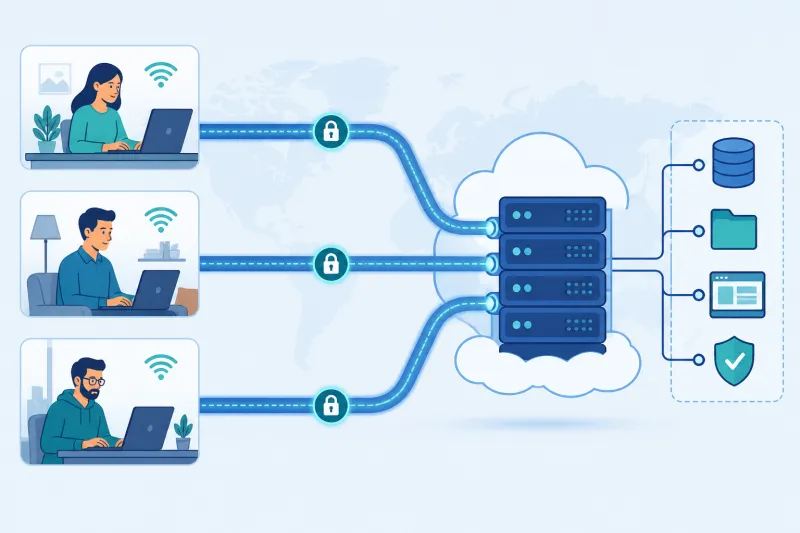
Remote employees need a reliable path to private systems—staging databases, internal tools, admin panels, office-only services—without turning every laptop into a flat network peer on production. A company VPN still plays that role for many teams, especially alongside SSO on applications. This guide is a practical blueprint for remote-access VPN: architecture choices, onboarding, security baselines, and day-two operations.
It assumes self-hosted gateways on cloud VPS infrastructure (Ubuntu, WireGuard as the default protocol) rather than consumer VPN apps.
What You'll Learn
- How to choose split tunnel vs full tunnel for employees
- A reference architecture for SMB and mid-size teams
- Onboarding and offboarding that do not depend on heroics
- Security baselines that matter more than buzzwords
- Support and performance habits for distributed workforces
- Best practices, mistakes, and FAQ
Start From the Access Problem
Write down what remote employees must reach:
- Private CIDRs (e.g.
10.0.0.0/8in your cloud) - Specific internal hostnames
- Protocols (HTTPS, SSH, RDP, DB ports)
Also write down what they must not casually reach: production databases with weak app auth, flat VLAN nostalgia, lateral movement paradise.
VPN grants a network path. It does not replace identity on applications. Design both.
Split Tunnel vs Full Tunnel
Split tunnel (default recommendation)
Only traffic to private destinations goes through the VPN. Public SaaS goes direct from the employee network.
Pros: lower latency to the internet, lower cloud egress cost, smaller blast radius for gateway outages
Cons: you do not inspect or egress all employee web traffic (often a feature, not a bug)
Full tunnel
Nearly all device traffic goes through the gateway (0.0.0.0/0 / ::/0 in WireGuard AllowedIPs terms).
Pros: centralized egress IP, possible filtering/inspection, uniform path
Cons: higher cost, higher latency, gateway becomes critical for “the internet works,” bigger abuse/exit responsibility
Practical policy: split tunnel for most staff; full tunnel for specific roles or short-lived needs. Document it.
Reference Architecture
- Regional WireGuard UDP endpoints close to employees or close to private resources (pick the dominant constraint).
- Ubuntu 22.04/24.04 LTS gateways, dedicated to VPN duties.
- Provider firewall + host firewall allowing only VPN ports (and tightly controlled SSH).
- Optional OpenVPN TCP/443 fallback for networks that block UDP.
- Internal DNS strategy — how
*.internalnames resolve on clients when connected. - Inventory of peers keyed to people/devices, not mystery pubkeys in a text file.
- App SSO still required for sensitive systems.
DigitalOcean droplets are a common, simple host for this pattern. TunnelFleet can automate DigitalOcean VPN server provisioning so you spend less time on install mechanics; if your private apps live primarily in another cloud, you may still place gateways there manually for routing convenience.
Identity, Devices, and Keys
Minimum bar:
- One peer identity per user device (laptop vs phone are different peers)
- Private keys never emailed in plaintext cleartext “for convenience”
- Offboarding removes peers the same day access should end
- Prefer MDM or at least disk encryption + OS update policy on company devices
- Contractors get expiry dates
WireGuard authenticates peers with keys—it does not know your IdP. Glue identity in your provisioning process: HR ticket → peer created → HR offboard → peer removed.
Onboarding Flow That Scales
A repeatable flow beats a wiki novel:
- Employee approved for VPN group
- Automation or ops creates peer + assigns tunnel IP +
AllowedIPs - Employee receives client profile via a secure channel (or scans a controlled QR for mobile)
- Employee connects and verifies: ping internal IP, resolve internal DNS, open one internal HTTPS app
- Record completion; support knows the verification checklist
Include OS-specific client install steps (Windows, macOS, Linux, iOS, Android) as short appendices—not a single tangled page.
Network Design Details Employees Feel
- Stable endpoint DNS for gateways (
vpn-us.example.com) so you can move IPs - MTU defaults that work on home Wi‑Fi (conservative beat fragile)
- Keepalive for NAT’d home routers
- Clear profile names when multiple regions exist (
wg-eu,wg-us) - Status page or chat alert when a region is down so people switch profiles
Performance complaints are often region choice, full tunnel, or MTU—not “remote work is impossible.”
Security Baseline
- Least-open firewall; no accidental app ports on the VPN node
- Unique keys; no shared “team” peer
- Regular OS patches
- Disable password SSH or restrict it; prefer keys/certificates for admin access
- Separate admin access path from employee tunnel IPs when feasible
- Logging: connection/auth-adjacent events with retention you can defend; avoid casual packet capture of employee traffic unless policy explicitly requires and discloses it
- Route only intended CIDRs; do not attach the VPN to flat production without segmentation
Remember lateral movement: a connected laptop malware problem becomes an on-network problem. Pair VPN with endpoint hygiene and app auth.
Day-Two Operations
Treat the VPN like production:
| Activity | Cadence |
|---|---|
| Peer access reviews | Monthly or on HR events |
| Gateway patching | Continuous / scheduled |
| Capacity check (CPU, bandwidth) | Weekly metrics glance |
| Restore drill (rebuild gateway) | Quarterly |
| Client profile updates | As endpoints/MTU change |
When someone says “VPN is down,” triage: client network UDP blocked? wrong profile? gateway CPU? auth key removed? DNS to endpoint failed? A short runbook saves senior engineer weekends.
Supporting Restricted Networks
Some home ISPs are fine; some corporate client sites and hotels are hostile to UDP. Provide:
- Documented OpenVPN TCP fallback
- Instructions for when to use it
- Expectation management (slower, last resort)
Do not silently put everyone on TCP because of one hotel.
Role-Based Access Patterns
Not every employee needs the same routes:
- Engineering — reach staging CIDRs and SSH jump targets
- Support — reach admin tooling networks only
- Contractors — time-boxed access to a single project CIDR
- Exec / general staff — maybe only a few internal web apps
Encode these as separate peer templates or groups with different AllowedIPs / route sets. Flat “everyone gets 10.0.0.0/8” is convenient and often overly broad.
Guest and BYOD Reality
If you allow BYOD:
- Require personal device peers to be distinguishable in inventory
- Prefer app-level access for highly sensitive systems instead of broad network routes
- Consider whether phones need VPN at all
If you disallow BYOD, enforce with MDM and refuse unofficial configs. Policy without enforcement becomes fiction.
Communication During Incidents
When a region fails:
- Announce status and which alternate profile to use
- Prefer DNS failover or documented secondary endpoints over silent IP swaps
- After recovery, run a short verification checklist company-wide if the failure was config-related (MTU, firewall)
Remote employees cannot walk over to IT. Clarity beats hero debugging in private DMs.
Training and Expectations
Spend one short live session (or a crisp internal video) covering:
- How to import the profile
- How to select a region
- What split tunnel means for “why isn’t all my traffic on VPN?”
- Who to contact, and what info to include (OS, profile name, screenshot of handshake status)
Engineers will tolerate terse docs. Mixed companies need clearer UX. The VPN can be technically perfect and still fail if people do not know which config to use on travel networks.
Measuring Success
Useful KPIs:
- Time-to-first-successful-connect for new hires
- Ticket volume tagged VPN (and cause codes: UDP block, auth, MTU, region)
- Regional availability
- Median latency from major employee locations to their assigned gateway
- Percent of peers inactive for 30+ days (cleanup candidates)
Optimize the KPI that hurts: if onboarding takes days, automation matters more than another cipher debate.
Travel and Temporary Networks
Travel weeks create predictable VPN tickets: hotel Wi‑Fi with UDP filters, conference networks with captive portals, and dual-VPN mistakes (personal VPN nested with corporate). Publish a short travel note: connect corporate VPN only after captive portal login succeeds; prefer the TCP fallback profile on hostile hotel networks; avoid stacking a consumer VPN underneath. Temporary access for onsite contractors should still use expiring peers—event week is when orphaned keys accumulate.
Best Practices
- Default split tunnel to private resources.
- Use WireGuard UDP as primary; TCP fallback optional and explicit.
- Automate peer lifecycle tied to HR/IdP events.
- Place regions based on measured user locations.
- Keep gateways dedicated and boring.
- Verify onboarding with a three-check test (IP, DNS, app).
- Monitor gateways; alert on downtime and CPU saturation.
- Review access when people change roles, not only when they leave.
Common Mistakes
- Full tunnel for all “for security” without egress budget or posture tooling.
- Shared WireGuard keys across a department.
- No offboarding checklist item for VPN.
- One distant gateway for a global company.
- VPN as the only control on sensitive admin interfaces.
- Undocumented regional profiles and random config files in Slack.
- Ignoring UDP blocks and declaring laptops defective.
- Letting contractors keep access “until the project archive is done.”
FAQ
Do remote employees still need VPN if we have SSO?
If all sensitive systems are internet-exposed with strong SSO and device checks, maybe not. If you keep private-only services, VPN (or a similar private path) remains useful. Many orgs run both.
Is WireGuard OK for non-technical staff?
Yes with packaged profiles and short instructions. The protocol is simple; your packaging must be too.
How many users per server?
Depends on usage patterns and instance size. Start with measured concurrency; do not trust blog round numbers. Light interactive loads often fit dozens per modest WireGuard VPS; full-tunnel heavy egress needs network budget first.
Should phones use the same VPN?
If phones need private apps, yes—as separate peers. If not, do not enroll them by default.
What about compliance?
Document access control, revocation, encryption, and logging retention. Self-hosted VPN can fit many frameworks when process is real. TunnelFleet helps with provisioning discipline on DigitalOcean; compliance evidence is still your policies and records.
Can we use personal consumer VPNs for work?
No as a corporate control. You do not manage inventory, routes, or revocation.
Split tunnel and DNS leaks—should we worry?
Understand what you optimized for. Split tunnel means public DNS for public sites is expected. Protect internal name resolution deliberately; do not confuse consumer “DNS leak” marketing with company split-tunnel design.
How do we handle someone who cannot install clients?
Managed devices and supported OS list should be explicit. Exceptions need a time-bounded process—not permanent shared jump desktops without review.
Summary
A practical employee VPN is regional WireGuard with split tunnel by default, tight peer lifecycle, optional TCP fallback, and application SSO still in front of sensitive systems. Optimize for onboarding clarity and revocation speed as much as for cryptography. Measure where people are, what they must reach, and what your cloud egress will cost if you full-tunnel by habit.
If you want to automate VPN server deployment instead of configuring everything manually, TunnelFleet helps you provision and manage VPN infrastructure on your own cloud provider with minimal manual setup.
Share this article
Practical guides on VPN infrastructure, server automation, and self-hosted networking from the TunnelFleet team.
View all articles by TunnelFleet Editorial →