How to Rotate VPN Keys
Table of Contents
VPN keys are long-lived credentials. If you never rotate them, every lost laptop, former contractor, and old backup becomes a permanent access grant. Rotation is not a crypto flex—it is inventory hygiene with a maintenance window.
This runbook covers planned and emergency rotation for WireGuard and OpenVPN on self-hosted servers, with dual-control windows so you do not lock out your workforce mid-day.
What You'll Learn
- When to rotate VPN keys vs when to revoke a single peer
- WireGuard server and peer rotation patterns
- OpenVPN certificate and CA considerations
- Dual-key / dual-config windows that avoid downtime
- Emergency compromise response
- Best practices, common mistakes, and FAQ
Rotation vs Revocation
Revoke when one identity should lose access now: remove the peer or revoke the cert, reconcile, done.
Rotate when the credential material should change even if the human remains valid: scheduled policy, suspected bulk exposure, algorithm migration, or server rebuild with new identity.
Do not rebuild the entire server PKI because one intern lost a phone—revoke that peer. Do rotate when a shared server private key may have leaked.
What Counts as a “Key” in Practice
WireGuard:
- Server interface private key
- Each peer’s private key (on the client device)
- Optional pre-shared keys (PSKs) per peer
OpenVPN:
- CA private key (crown jewels)
- Server certificate/key
- Client certificates/keys
tls-auth/tls-cryptstatic keys (if used)- DH parameters (less sensitive than CA, still manage deliberately)
Map each to an owner and a rotation policy in inventory.
Policy Baselines
Reasonable starting policy for many teams:
- Peer/user keys: rotate or expire on employment change; otherwise time-box (for example 180–365 days) if compliance asks
- Server WireGuard keys: rotate on compromise, major rebuild, or annual maintenance
- OpenVPN CA: rare, heavy ceremony—protect hard so you rotate seldom
- PSKs: rotate with peer or on a defined cadence for high-assurance sets
- Bootstrap/API tokens used by agents: short-lived, independent of VPN peer keys
Write the policy down. Unwritten rotation never happens.
WireGuard: Rotating a Single Peer
Planned peer rotation (client still trusted):
- Generate a new keypair on the client (or via your MDM/control plane).
- Add a new peer entry on the server with the new public key and the same (or newly assigned) tunnel IP strategy.
- Distribute the new client config.
- Confirm handshake on the new key (
wg showlatest handshake). - Remove the old peer entry; reconcile.
- Securely delete old private key material from the client.
If your control plane cannot hold two peers briefly, schedule a short maintenance window and swap atomically—accepting a brief disconnect.
Same tunnel IP vs new IP: keeping the IP eases firewall rules; ensure the old public key cannot still claim it. Never leave two peers with overlapping AllowedIPs claiming the same addresses.
WireGuard: Rotating the Server Interface Key
This changes the server’s identity. Every client peer block that references the old server public key must update.
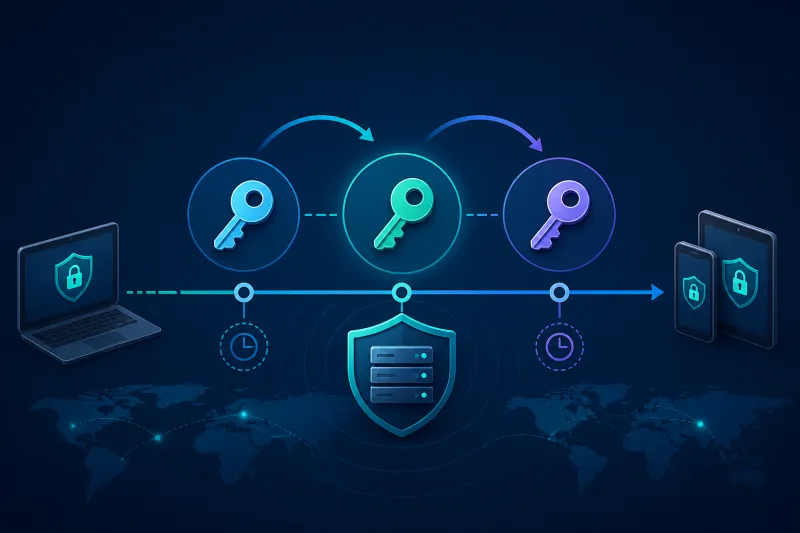
Recommended dual-window approach when you can run parallel interfaces or parallel endpoints:
Option A — Parallel interface (cleanest)
- Create
wg1with new server key and a new listen port (or new address). - Add all peers to
wg1(same client public keys initially). - Issue updated client configs pointing at the new endpoint/port and new server public key.
- Monitor migration percentage via handshakes.
- Drain
wg0; decommission old port/key.
Option B — In-place cutover (small fleets)
- Announce maintenance.
- Generate new server key; update server config.
- Push regenerated client configs simultaneously (MDM/control plane).
- Bounce interface; verify synthetics.
- Fail back only if you kept the old key in a sealed break-glass backup for the window.
At hundreds of clients, Option A or a blue/green DNS hostname (vpn-fra.example.com → new droplet) is safer.
WireGuard PSKs
To rotate a PSK:
- Set the new PSK on the server peer entry and client together—order depends on your tooling; aim for a coordinated update.
- Prefer control-plane atomic updates per peer.
- Treat PSK like a password: length, uniqueness per peer if possible, never commit to git.
If only one side updates, handshakes fail until fixed—monitor.
OpenVPN: Client Certificate Rotation
- Issue a new client cert from the CA with a new expiry.
- Deliver new bundle (cert, key, updated CA chain as needed).
- Confirm connect.
- Revoke old cert; publish CRL/OCSP; reload OpenVPN if required.
- Ensure servers fetch new CRL automatically—stale CRLs are how revoked users linger.
Prefer short-lived client certs if your PKI can issue them automatically.
OpenVPN: Server Cert Rotation
Similar dual-endpoint strategy: stand up a sibling service or parallel port with the new server cert, migrate clients, retire the old listener. Update pinned server identities in client configs carefully.
OpenVPN: CA Rotation (Rare)
CA rotation is a migration project:
- Generate new CA offline
- Issue new server and client certs
- Run dual trust during transition if clients can trust both CAs temporarily
- Revoke old CA only after migration completes
- Store new CA private key offline/HSM; limit ceremony participants
If you rotate CAs casually, you do not understand the blast radius.
Emergency: Suspected Compromise
Assume worst until proven otherwise:
- Identify scope: one peer key, server key, CA, or agent token?
- Contain: firewall deny public VPN ports if mass exposure; or revoke known-bad peers immediately.
- Rotate exposed material using dual-window if users must stay online.
- Rebuild VPS from known-good templates if host compromise is possible (DigitalOcean droplet replace).
- Audit inventory for unexplained peers and recently issued certs.
- Review logs for connection times consistent with abuse (without capturing payloads).
- Postmortem: how material leaked; fix the pipeline.
Do not only “change the password” on a dashboard if the WireGuard server private key leaked—that key is the credential.
Automation Requirements
Manual rotation fails at scale. You need:
- Inventory of every peer and cert with
issued_at/expires_at - One-click or API revoke
- Config regeneration and secure distribution
- Telemetry for handshake failures after rotation events
- Runbooks linked from alerts
TunnelFleet-style control planes exist so peer lifecycle is not an SSH cottage industry.
Client Distribution Channels
Rotation fails when configs cannot reach devices:
- MDM for company laptops/phones
- Authenticated download portal with short-lived links
- Agent-updater on managed desktops
Email attachments with private keys are an anti-pattern. If you must use chat for emergencies, use a sealed channel, expire the material, and rotate again after the incident when a proper channel is available.
Track config_version on each peer. Migration dashboards (“72% on server key v4”) turn cutovers from hope into metrics.
Database and Backup Hygiene
Old private keys in:
- Git history
- Unencrypted disk snapshots
- Laptop Downloads folders
- CI artifact caches
…mean rotation did not fully land. After server key rotation, scrub snapshots that contain the old wg0.conf, or treat those snapshots as sensitive secrets until deleted. Inventory should record key_generation so restores from backup cannot silently reintroduce retired material without detection.
Legal and Compliance Evidence
Some audits ask for proof of rotation. Keep:
- Tickets linking policy cadence to completed jobs
- Audit log entries of revoke/rotate events (without secret values)
- Exception list for devices that missed the window (with owners)
Evidence is metadata about the ceremony—not a zip of everyone’s private keys.
Staged Communication Templates
Have copy ready before the maintenance window:
- 72 hours: what changes, who is affected, expected disconnect seconds
- 1 hour: reminder with self-serve config link
- Start: “rotation in progress”
- Finish: “verify green check / handshake; contact support if failing”
Support load tracks communication quality as much as crypto ceremony. Silent rotations create duplicate emergency tickets that slow the migration dashboard.
Dual Inventory Records
During peer rotation, represent peer_id with key_generation=n and key_generation=n+1 rows rather than overwriting in place. Overwrite-in-place loses forensic trail and complicates rollback. Garbage-collect generation n only after handshake success on n+1 and a grace period.
OpenVPN tls-crypt / tls-auth Rotation
Static TLS hardening keys (tls-crypt, tls-auth) are shared material. Rotate them like server identity:
- Stand up a parallel profile or port with the new static key
- Migrate clients
- Retire the old listener
Trying to change tls-crypt in place on a large fleet without a dual window causes a simultaneous disconnect storm. Treat static keys as first-class inventory secrets with generation numbers.
Best Practices
- Expire peers by default for contractors and temporary devices.
- Prefer revoke-one over rotate-all when scope is narrow.
- Use dual endpoints for server identity changes.
- Never email private keys in cleartext; use short-lived download links or MDM.
- Keep CA offline for OpenVPN.
- Log rotation events (who, what, when)—not the secret itself.
- Test restore of break-glass configs in staging.
- Align SSH key rotation with staff lifecycle separately from VPN peers.
Common Mistakes
Deleting the old peer before the new handshake succeeds.
Reusing private keys after “rotation” (renaming files does not rotate).
Forgetting mobile devices still holding old profiles.
CRL not distributed after OpenVPN revoke.
Rotating server keys in git history but leaving old keys on disk backups.
No communication plan—users discover failure via Slack panic.
Rotating during your highest traffic hour without a dual window.
FAQ
How often should WireGuard peer keys rotate?
On staff/device lifecycle events at minimum. Add time-based expiry if policy requires. Continuous rotation without automation causes outages.
Does regenerating a client config without new keys count as rotation?
No. Rotation means new key material. Redistributing the same private key just spreads the leak surface.
Can I rotate without user action?
Only if your managed clients pull new configs automatically. Unmanaged users must install an updated profile—plan support load.
What if a departed employee still has a config?
Revoke their peer/cert immediately. Rotation of unrelated users is optional; revocation of that identity is mandatory.
Should I rotate after every VPS rebuild?
If the new droplet generates a new server key, clients must update—the rebuild is a server rotation. Reserved IPs and DNS ease the endpoint half; public keys still change unless you deliberately restore key material (which has trade-offs).
Is a PSK a substitute for rotating public keys?
No. It is additional material. Compromise of a private key still requires peer replacement.
How do I practice?
Run a quarterly game day: rotate a staging server key with dual interface; measure time-to-migrate and failure rate.
Summary
Rotate VPN keys on purpose: revoke individuals quickly, change server identities with dual windows, and treat OpenVPN CAs as high-ceremony. Automation and inventory determine whether rotation is routine or an incident. Pair every rotation with verification of handshakes and secure deletion of old private material.
If you want to automate VPN server deployment instead of configuring everything manually, TunnelFleet helps you provision and manage VPN infrastructure on your own cloud provider with minimal manual setup.
Share this article
Practical guides on VPN infrastructure, server automation, and self-hosted networking from the TunnelFleet team.
View all articles by TunnelFleet Editorial →