Site-to-Site VPN Explained
Table of Contents
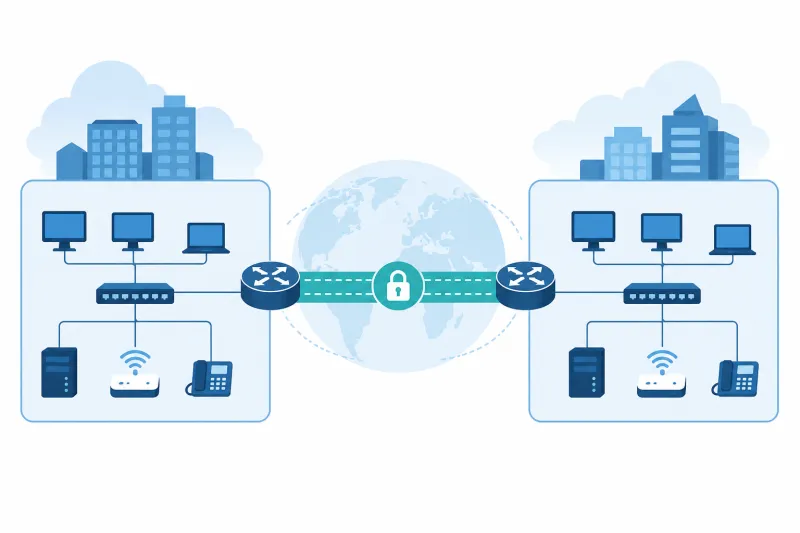
A site-to-site VPN connects entire networks rather than a single laptop to a concentrator. Two (or more) gateways encrypt traffic between sites so hosts on LAN A can reach hosts on LAN B using private addresses—without placing those hosts on the public internet.
If you link an office to a cloud VPC, stitch two datacenter segments, or connect partner networks with tight routing, you are in site-to-site territory. The protocols may look familiar (IPsec, WireGuard, OpenVPN), but the design focus shifts to prefixes, gateways, failover, and routing hygiene.
This guide explains the architecture, how it differs from remote-access VPN, protocol choices, a practical routing mental model, and the mistakes that cause “the tunnel is up but finance can’t reach the ERP.”
What You'll Learn
- What site-to-site VPN means in network architecture terms
- How gateways, tunnels, and routes fit together
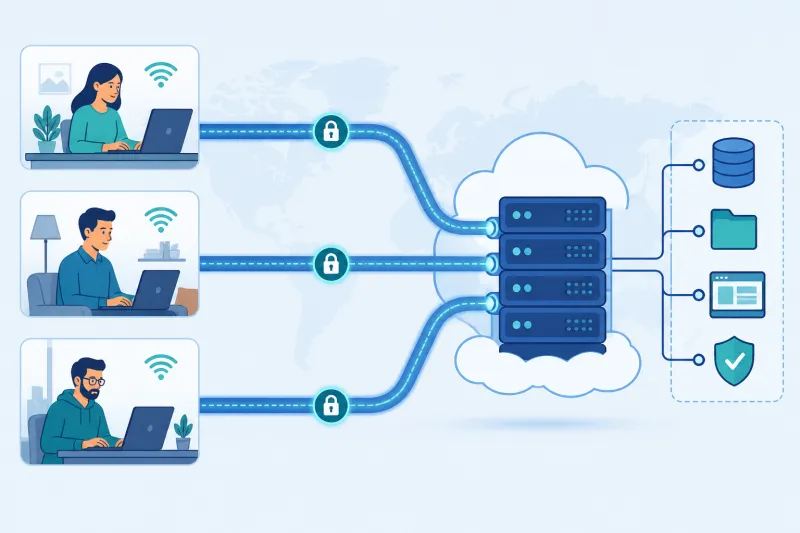
- How site-to-site differs from remote-access (road warrior) VPN
- Protocol options and when each fits
- Addressing, firewall, and high-availability considerations
- Best practices, common mistakes, and FAQ
What Site-to-Site VPN Actually Is
In a site-to-site design:
- Site A has a gateway (firewall, router, or Linux VPS) with access to local prefix
10.1.0.0/16. - Site B has a gateway with local prefix
10.2.0.0/16. - The gateways authenticate each other and build an encrypted tunnel.
- Each site routes the remote prefix toward its local gateway.
- Hosts do not run VPN clients; they use normal IP routing.
The tunnel is infrastructure. Users on a desk phone VLAN should not need a WireGuard app to print across sites—that is the point.
Hub-and-spoke versus mesh
Hub-and-spoke. Branch sites tunnel only to a hub (HQ or cloud). Inter-branch traffic hairpins through the hub. Simple policy, extra latency.
Mesh. Sites peer with many or all others. Lower latency paths, more tunnels and key management.
Hybrid. Regions mesh; small branches spoke to the nearest hub.
Choose topology based on traffic patterns, not aesthetics. If branches rarely talk to each other, hub-and-spoke wins on ops cost.
Site-to-Site Versus Remote Access
| Concern | Site-to-site | Remote access |
|---|---|---|
| Endpoint | Gateway ↔ gateway | User device ↔ concentrator |
| Routing unit | Subnets / prefixes | Host tunnel IPs + pushed routes |
| Client software on PCs | No | Yes |
| Identity | Gateway certs/PSKs/keys | Per-user/device identity |
| Typical failure ticket | “Subnet X unreachable” | “My laptop won’t connect” |
Many organizations run both: site-to-site for office↔cloud, remote access for travelers. Do not overload one gateway config until neither is understandable.
The Routing Mental Model
Tunnels without routes are expensive decorations.
On Site A’s gateway you need:
- A tunnel interface or IPsec policy that can carry packets to Site B
- A route:
10.2.0.0/16 via <tunnel>(or policy-based selectors that imply it) - Firewall permission for the interesting traffic
- Return path symmetry on Site B for
10.1.0.0/16
On hosts inside Site A, either:
- Use the site gateway as default route (common), or
- Install more specific routes for remote prefixes (less common on every desktop)
Cloud VPCs add route tables: the cloud router must send 10.1.0.0/16 to the VPN instance or virtual gateway. Forgetting the cloud route table entry is the top cloud-specific failure mode.
Policy-based versus route-based IPsec
Policy-based. Traffic selectors define what enters encryption (“interesting traffic”). Classic firewall IPsec.
Route-based. A tunnel interface exists; you route prefixes into it like any other link. Often easier to automate and to marry with dynamic routing.
WireGuard is naturally route-oriented (AllowedIPs + OS routes). Prefer route-based thinking even when the implementation is policy-based—document the prefixes explicitly.
Protocol Choices for Site-to-Site
IKEv2/IPsec
Still the lingua franca when one side is a hardware firewall or a cloud “virtual private gateway” that only speaks IPsec. Mature, sometimes fiddly. Excellent when interoperability is mandatory.
WireGuard
Excellent when you control Linux (or supported BSD/router) ends: simple configs, strong performance, easy automation. AllowedIPs must enumerate remote site prefixes carefully. Persistent keepalive may be needed when one side is behind NAT.
OpenVPN
Viable for site-to-site, especially if you already standardize on it. Heavier than WireGuard for pure gateway links; TCP mode sometimes used for nasty middleboxes at the cost of performance.
Provider-native peering
Some clouds offer VPC peering or private interconnect products that are not VPNs but solve similar reachability. Use them when both sides live in ecosystems that support them; still remember they are not encrypted overlays in the VPN sense unless the product says so. For TunnelFleet-oriented workflows, the practical path is VPN software on VPS gateways you manage—today with DigitalOcean as the supported cloud provisioning target.
Addressing: The Make-or-Break Detail
Unique prefixes across sites. If two offices both use 192.168.1.0/24, you cannot route unambiguously without NAT hacks. Renumber early; NAT-in-the-middle site-to-site is technical debt with interest.
Tunnel / transit subnets. Point-to-point /30 or WireGuard /24 overlays help gateway reachability and monitoring. Do not overlap those with LAN ranges either.
Summarization. Advertise aggregates where possible so routing tables stay readable.
DNS. Cross-site name resolution needs deliberate design (split DNS, conditional forwarders). IP-only success with DNS failure still looks like outage to humans.
Minimal WireGuard Site-to-Site Sketch
Site A gateway (10.1.0.1 is its LAN IP; tunnel 10.255.255.1):
[Interface]
Address = 10.255.255.1/30
ListenPort = 51820
PrivateKey = <SITE_A_PRIVATE>
PostUp = iptables -A FORWARD -i wg0 -j ACCEPT; iptables -A FORWARD -o wg0 -j ACCEPT
PostDown = iptables -D FORWARD -i wg0 -j ACCEPT; iptables -D FORWARD -o wg0 -j ACCEPT

[Peer]
PublicKey = <SITE_B_PUBLIC>
Endpoint = site-b.example.com:51820
AllowedIPs = 10.255.255.2/32, 10.2.0.0/16
PersistentKeepalive = 25
Site B mirrors with its key, AllowedIPs = 10.255.255.1/32, 10.1.0.0/16, and endpoint of Site A if bidirectional initiation is required.
Enable forwarding on both gateways:
echo 'net.ipv4.ip_forward=1' | sudo tee /etc/sysctl.d/99-site-to-site.conf
sudo sysctl --system
Add LAN routes (or use PostUp ip route add ...) so hosts using each gateway as their router learn the remote prefix. Open UDP 51820 on cloud and host firewalls.
Verify:
ping -c 3 10.255.255.2
ping -c 3 10.2.0.10   # a host on the remote LAN
sudo wg show
traceroute 10.2.0.10
Firewalls and Zero Trust Reality
A site-to-site tunnel can accidentally become a flat, overly trusting meganet. Treat the tunnel as a carrier, then apply east-west policy:
- Allow only required ports between sites
- Segment guest Wi-Fi from cross-site finance systems
- Log accepts/denies at gateways
- Do not assume encryption equals authorization
Zero trust ideas still apply: authenticate users/apps where possible; do not rely solely on “they came from the other LAN.”
Availability and Failure Modes
Single gateway = single point of failure. For critical links, plan standby gateways, VRRP/anycast patterns, or cloud HA constructs appropriate to your stack.
Path failure versus crypto failure. Monitoring should distinguish “UDP blocked” from “keys mismatch” from “route missing.”
MTU black holes. Site-to-site links with lower effective MTU break large TCP segments mysteriously. Clamp MSS or lower MTU on tunnel interfaces deliberately.
Asymmetric routing. Multiple exits without careful design cause state firewall drops. Keep return paths predictable.
Best Practices
-
Draw the prefixes before you generate keys. Addressing first, crypto second.
-
Name tunnels and document owners. Future you will inherit this.
-
Monitor handshake freshness and prefix reachability separately.
-
Change one side at a time during cutovers; keep a rollback route.
-
Prefer route-based mental models and explicit allowed prefix lists.
-
Encrypt management of the gateways. A site-to-site box with open SSH on the internet is irony.
-
Rehearse key rotation. Especially for PSKs on IPsec.
-
Keep remote-access VPNs on a distinct design even if they share hardware.
Common Mistakes
Overlapping LAN CIDRs. The classic.
Tunnel up, cloud route table empty. Packets never leave the VPC toward the gateway.
AllowedIPs / traffic selectors missing the LAN prefix. Only gateway-to-gateway pings work.
NAT both sides “to make overlap work.” Hurts application protocols and debugging.
No keepalive when one gateway is behind NAT/CGNAT. Peer appears dead randomly.
Hairpinning all internet traffic through site-to-site unintentionally. Bandwidth and latency surprises.
Ignoring time sync on IPsec. Auth failures that look random.
Assuming the tunnel replaces backups. Reachability ≠ data durability.
FAQ
Do end users install software for site-to-site?
Usually no. Gateways hold the tunnel; endpoints route normally.
Is site-to-site more secure than remote access?
Not inherently. It changes the trust boundary. A compromised office PC may now reach the remote site if east-west rules allow it. Design controls accordingly.
WireGuard or IPsec for office↔cloud?
If both ends are Linux under your control, WireGuard is often faster to operate. If a hardware firewall or managed cloud VPN gateway mandates IPsec, use IKEv2/IPsec.
Can I site-to-site three locations?
Yes—hub-and-spoke or mesh. Budget key distribution and routing complexity.
How is this different from VPC peering?
VPC peering connects cloud networks within/between provider routing domains and is not always an encrypted VPN overlay. Site-to-site VPN encrypts over public (or otherwise untrusted) paths between gateways you define.
Do I need public IPs on both gateways?
At least one side needs a reachable endpoint for the other to initiate—unless you use a broker/rendezvous design. Dual public endpoints simplify bring-up.
What bandwidth should I expect?
Min(path capacity, CPU crypto capacity, provider caps). Measure with realistic packet sizes; VPN overhead and small packets reduce goodput.
Can site-to-site replace SD-WAN?
Overlaps exist. SD-WAN products add steerable multi-path policy and often vendor orchestration. A plain VPN is the cryptographic and routing core without the full SD-WAN feature set.
Should DHCP cross the tunnel?
Usually no. Keep DHCP local; route between stable subnets. Bridged L2 site-to-site exists but is fragile at scale.
Where does a product like TunnelFleet fit?
TunnelFleet helps you provision and manage VPN servers on your cloud provider so gateway hosts are easier to stand up and operate. Site-to-site routing design—prefixes, failover, firewall policy—remains an architecture exercise you still own.
Summary
Site-to-site VPN links networks through encrypted gateway tunnels and ordinary routing. Success depends less on brand of protocol and more on unique addressing, correct routes on both sides (including cloud route tables), firewall policy that does not invent a flat mega-LAN, and monitoring that catches silent path failure.
If you remember only a few points:
- Gateways hold crypto; routes deliver packets
- Unique site prefixes beat clever NAT
- Topology follows traffic patterns
- Encryption ≠ authorization between sites
- Test host-to-host flows, not only gateway pings
Design the overlay on paper, then implement with the protocol your endpoints can support cleanly—WireGuard when you own the Linux edges, IPsec when interoperability demands it.
If you want to automate VPN server deployment instead of configuring everything manually, TunnelFleet helps you provision and manage VPN infrastructure on your own cloud provider with minimal manual setup.
Share this article
Practical guides on VPN infrastructure, server automation, and self-hosted networking from the TunnelFleet team.
View all articles by TunnelFleet Editorial →