MTU Optimization for VPN Tunnels
Table of Contents
MTU problems rarely announce themselves as “MTU problems.” They show up as websites that load text but not images, SSH sessions that hang on large pastes, speed tests that underperform, or VPN users who swear the tunnel is “fine for Slack but broken for downloads.” If you run WireGuard or OpenVPN on a VPS, MTU optimization is one of the highest-leverage performance fixes you can make—once you treat it methodically.
This guide explains why VPN encapsulation shrinks usable packet size, how to find a working tunnel MTU, and how MSS clamping complements interface MTU settings.
What You'll Learn
- What MTU and MSS mean on a VPN path
- Why tunnels need smaller MTUs than raw Ethernet
- How to discover path MTU without guessing forever
- How to set MTU for WireGuard and OpenVPN
- When to use MSS clamping
- Best practices, failure modes, and FAQ
MTU, MSS, and Why VPNs Care
MTU (Maximum Transmission Unit) is the largest IP packet a link will carry without fragmentation (for the common Ethernet case, often 1500 bytes).
MSS (Maximum Segment Size) is a TCP concept: roughly the largest TCP payload a side is willing to send. MSS is derived from MTU minus IP and TCP headers.
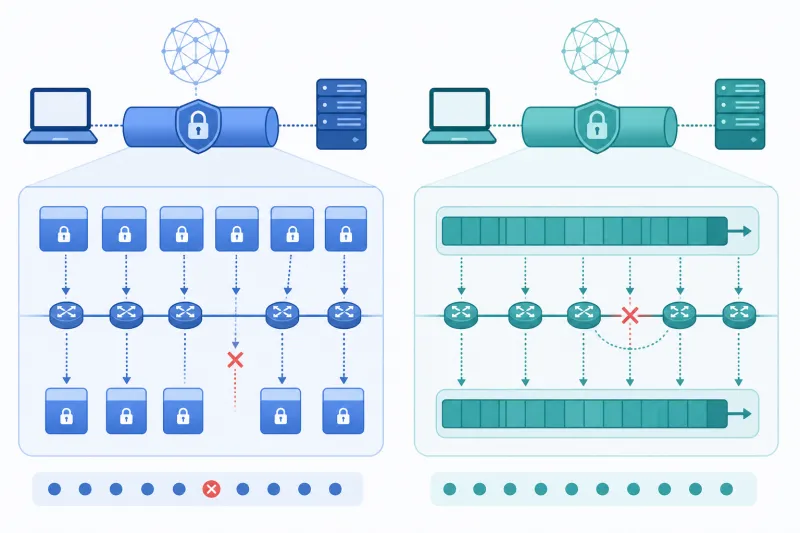
VPN encapsulation adds headers (WireGuard, OpenVPN, sometimes outer TCP/TLS). Those bytes consume the 1500-byte budget. If inner packets still assume a 1500 MTU, they become too large for the outer path. Results:
- Fragmentation (often dropped or mishandled on the internet)
- PMTUD black holes (ICMP “too big” filtered → silent stalls)
- Selective failure for large payloads only
Small packets (TCP ACKs, DNS, chatty apps) keep working. Large transfers die. That pattern is your clue.
How Much Headroom Does a Tunnel Need?
Exact overhead depends on protocol options (IPv4 vs IPv6 outer/inner, UDP vs TCP outer, encryption framing). Practical engineering ranges used in the field:
| Setup | Common tunnel MTU starting points |
|---|---|
| WireGuard over IPv4/UDP | 1420, 1380, 1280 |
| OpenVPN UDP | similar ballpark; validate |
| OpenVPN TCP / wrapped paths | often needs to go lower |
| Extra encapsulation (VPN over VPN, DS-Lite quirks) | push toward 1280 or below |
1280 is a safe floor for IPv6-related minimums and a common “just make it work” value. Higher MTUs improve efficiency when the path allows them—test upward from a known-good floor rather than downward from 1500 forever.
Symptoms Checklist
Suspect MTU when you see:
- Ping with small sizes works; large ping sizes fail (when ICMP is allowed)
- TCP connections stall after handshake during bulk transfer
- Browser issues with specific sites (often those using larger responses)
- iperf3 through the tunnel much worse than bare path with low CPU
- Only some client networks affected (hotel Wi‑Fi, LTE, satellite)
Do not start with exotic sysctls. Start with size.
Discovery Method That Works
1. Confirm the tunnel routes what you think it routes
ip route get DESTINATION
sudo wg show   # or openvpn status
Wrong routes produce “MTU-like” symptoms that no MTU change will fix.
2. Binary search with ping (when ICMP works)
From a client, toward an address through the tunnel:
# Adjust sizes; -M do (don't fragment) on Linux
ping -M do -s 1372 -c 3 10.66.66.1
Payload size + 28 bytes (IPv4+ICMP headers) ≈ total IP packet size. If 1372 payload works, try higher; if it fails, go lower. Convert the largest working total size into a tunnel MTU candidate with margin for your encapsulation.
ICMP is often blocked. When ping cannot tell the truth, use TCP-based tests (large file over scp/curl) while you change MTU, or use tools that perform TCP MSS discovery. The principle stays the same: change one variable, observe large-payload success.
3. Trace where drops happen
If only clients on a certain ISP fail, the bottleneck may be on the access network, not your VPS. Keep a working low MTU for those users (client-side MTU) or a globally conservative server MTU if you must pick one value for all.
Setting MTU on WireGuard
In wg-quick configuration:
[Interface]
Address = 10.66.66.1/24
PrivateKey = ...
ListenPort = 51820
MTU = 1280

[Peer]
PublicKey = ...
AllowedIPs = 10.66.66.2/32
Apply:
sudo wg-quick down wg0
sudo wg-quick up wg0
ip link show wg0
Match both sides to the same MTU unless you have a deliberate reason not to. Mismatched MTUs create confusing, asymmetric failure.
For a live experiment without editing files:
sudo ip link set dev wg0 mtu 1280
Persist the value that survives real traffic, not only ping.
Setting MTU on OpenVPN
Common directives:
tun-mtu 1280
# sometimes also:
mssfix
Exact behavior interacts with tun-mtu, fragment, and mssfix. Prefer understanding one approach:
- Lower
tun-mtuto fit encapsulation, or - Use
mssfixso TCP negotiates smaller segments even if the tun MTU is imperfect
Blindly enabling every fragmentation-related option at once makes regressions hard to reverse. Change, test, commit to config management.
MSS Clamping: The TCP Safety Net
Even with a correct tunnel MTU, TCP peers far away may still assume larger MSS based on their local interfaces. MSS clamping on the VPN gateway (or edge firewall) rewrites TCP SYN MSS options so senders choose payloads that fit your tunnel.
On Linux with iptables/nftables, clamping to a value derived from tunnel MTU is a common pattern for TCP traffic traversing wg0 or tun0. This helps especially for full-tunnel internet egress where you do not control the remote servers’ PMTUD behavior.
Remember: MSS clamping helps TCP. UDP applications must heed path MTU on their own (or you keep tunnel MTU safely low).
Interaction With Cloud Paths
Cloud VPS providers (including DigitalOcean) typically present a 1500-byte Ethernet MTU to the droplet/VM. Your outer packets leave toward the internet with VPN overhead included. The weak link is often:
- Client Wi‑Fi / CPE
- Carrier CGNAT paths
- Intermediate tunnels (guest Wi‑Fi portals, corporate proxies)
That is why a lab VM-to-VM WireGuard test can pass at MTU 1420 while employee laptops need 1280. If you serve diverse clients, prefer a conservative default and raise MTU only for known-good site-to-site links.
Performance Trade-off
Lower MTU → more packets for the same data → slightly higher per-byte overhead and PPS. In practice, a stable 1280 MTU that never stalls beats an unstable 1420 that corrupts downloads. Optimize for reliability first; reclaim efficiency on controlled paths second.
Worked Example: WireGuard Overhead Budget
A simplified IPv4 mental model:
- Outer Ethernet MTU: 1500
- Outer IPv4 header: 20
- Outer UDP header: 8
- WireGuard overhead: commonly treated as about 32 bytes for budgeting (exact framing can vary with options)
- Inner IPv4 header: 20
- Inner TCP header: 20 (without options)
You do not need to memorize exact constants if you measure. The point is that inner TCP payload must shrink. Teams that set wg0 MTU to 1500 are asking the outer path to carry more than 1500 bytes once encapsulation is added—hence fragmentation or black holes.
When you set MTU = 1420 on wg0, you are declaring the largest inner IP packet the tunnel interface should emit. That value must fit inside the outer 1500 budget after WireGuard encapsulation. If real-world paths add PPPoE or extra tunnels, 1420 may still be too high—drop to 1280 and retest.
Client-Side Overrides
Sometimes the server MTU is fine for cloud-to-cloud peers but one ISP path misbehaves. Options:
- Lower MTU only on that client’s interface/profile
- Keep a conservative org-wide default
- Provide a “compat” profile with MTU 1280 for problem networks
Avoid instructing users to edit random sysctls on physical Wi‑Fi interfaces as a first step; fix the tunnel MTU first.
Verification Traffic That Matches Reality
After changing MTU:
- Transfer a 100+ MB file over the tunnel (scp/curl to an internal HTTPS endpoint)
- Open several image-heavy sites if you use full tunnel
- Re-run iperf3 P1 and P4
- Confirm no user-visible stalls for 10–15 minutes of normal work
Ping-only verification is necessary but not sufficient.
Best Practices
- Treat “works for small packets only” as an MTU incident until proven otherwise.
- Start from a safe MTU (often 1280), then raise with tests on representative client networks.
- Keep server and client tunnel MTUs consistent.
- Use MSS clamping for TCP transit through the VPN gateway when serving full-tunnel users.
- Document the chosen MTU next to the server inventory and peer templates.
- Re-test after adding extra encapsulation (TCP wrappers, nested tunnels).
- Separate site-to-site MTU profiles from road-warrior profiles when needed.
- Validate with real bulk TCP transfers, not ping alone.
Common Mistakes
- Setting client MTU to 1500 on a VPN interface “because Ethernet.”
- Fixing only one side of the tunnel.
- Enabling every OpenVPN fragment option simultaneously.
- Ignoring MSS and fighting only interface MTU for browser traffic.
- Blaming WireGuard crypto for stalls that vanish at MTU 1280.
- Copying an MTU from a blog without testing your path.
- Forgetting that IPv6 inner/outer changes overhead assumptions.
- Changing MTU and firewall rules in the same deploy, then mis-attributing the fix.
FAQ
What MTU should I use for WireGuard?
There is no universal number. 1280 is a safe default for mixed clients; 1420 often works on clean cloud-to-cloud paths. Measure.
Why do some sites fail through the VPN?
Sites that send larger TLS records or assets stress path MTU. Others stay under the limit by chance.
Is PMTUD enough?
In theory, yes. In practice, ICMP filtering breaks it. Do not rely on PMTUD alone for VPN road warriors.
Does MTU affect latency?
Slightly via efficiency, not usually via base RTT. The big win is avoiding stalls and retransmit storms from black-holed large packets.
Should I set MTU on the physical NIC?
Rarely for a standard cloud VPS. Focus on the tunnel interface. Physical NIC MTU changes are a different class of problem (jumbo frames in private DCs, etc.).
OpenVPN TCP needs a lower MTU?
Often yes, because outer TCP framing consumes more overhead and paths are messier. Validate; do not assume UDP numbers transfer.
Can automation help?
Yes—bake MTU into server templates and client config generators so humans do not “fix it in chat.” TunnelFleet-oriented workflows on DigitalOcean still expect you to choose sane network defaults; consistency beats one-off SSH edits.
How do I know MSS clamping works?
Capture TCP SYNs leaving the tunnel path and inspect the MSS option, or observe that large HTTPS transfers stop stalling after clamp deployment with unchanged MTU.
Summary
VPN encapsulation reduces usable packet size. When MTU is wrong, large transfers fail while small packets succeed. Find a working tunnel MTU with controlled tests, align both peers, add MSS clamping for TCP safety on gateways, and prefer stable conservative values for diverse remote clients. Efficiency optimizations come after reliability.
If you want to automate VPN server deployment instead of configuring everything manually, TunnelFleet helps you provision and manage VPN infrastructure on your own cloud provider with minimal manual setup.
Share this article
Practical guides on VPN infrastructure, server automation, and self-hosted networking from the TunnelFleet team.
View all articles by TunnelFleet Editorial →