Configure DNS for Your Server
Table of Contents
DNS is how humans and configs find your server after the IP changes, how TLS certificates prove identity, and how WireGuard clients keep a stable Endpoint hostname. Misconfigured DNS causes outages that look like “VPN is down” or “SSH hangs” when the network path is fine.
This guide covers practical DNS setup for an Ubuntu VPS: public A/AAAA records, TTL strategy, reverse DNS, resolver configuration on the server itself, and naming patterns that work for VPN endpoints. Examples assume you can edit records at your DNS host and that the VPS runs on DigitalOcean or similar cloud networking.
You do not need exotic DNS features for a solid WireGuard host. You need correct records, predictable TTLs, and resolvers that keep the server itself operational.
What You'll Learn
- Which record types matter for a VPN/admin VPS
- How to choose TTLs for addresses that may change
- How to verify resolution with
digand client behavior - Reverse DNS (PTR) when it helps—and when to skip it
- How Ubuntu’s
systemd-resolvedfits server operations - Naming conventions for VPN endpoints and admin hosts
Forward DNS: A and AAAA
Map a hostname to your Droplet:
vpn.example.com.   300  IN  A     203.0.113.10
vpn.example.com.   300  IN  AAAA  2001:db8::10
Rules of thumb:
- Publish A for IPv4 always if clients use IPv4
- Publish AAAA only when IPv6 works end to end
- Use the same hostname in WireGuard
Endpoint = vpn.example.com:51820
Verify:
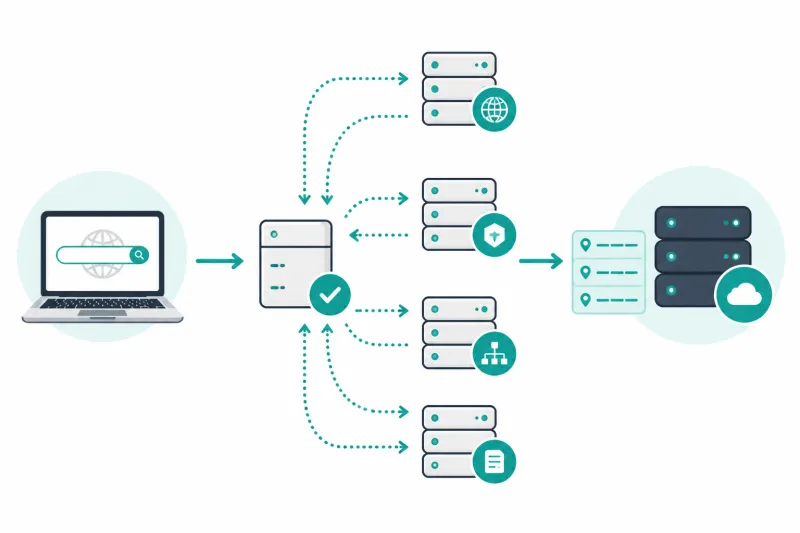
dig +short A vpn.example.com
dig +short AAAA vpn.example.com
dig +trace vpn.example.com
From your laptop:
getent ahostsv4 vpn.example.com
getent ahostsv6 vpn.example.com
TTL Strategy
| Situation | Suggested TTL |
|---|---|
| Stable production IP | 300–3600 seconds |
| Upcoming migration / Floating IP cutover | 60–300 seconds beforehand |
| Throwaway lab | 60–300 seconds |
Lower TTLs before a move; raise them after the new address is stable. DNS cannot update every client instantly—TTL only bounds cache duration. WireGuard clients that already resolved an Endpoint may need reconnect or restart to pick up a new address depending on the OS client.
Names Worth Creating
Keep a small, boring schema:
vpn.example.com— WireGuard UDP endpointssh.example.comoradmin.example.com— optional admin SSH name (can be the same host)- Avoid putting secrets in hostnames
CNAME to a provider-specific name is fine if you understand apex limitations. Many operators point vpn as an A/AAAA directly at the Droplet or Floating IP.
Floating IPs and Rebuilds
On DigitalOcean, a Floating IP can move between Droplets. Point DNS at the Floating IP so rebuilds do not require global DNS surgery—still lower TTL before the first cutover to the Floating IP.
If you do not use Floating IP, update A/AAAA when the Droplet IP changes and expect client caches to hold the old address until TTL expiry.
Reverse DNS (PTR)
PTR maps IP → hostname. It matters most for outbound SMTP reputation. For a pure WireGuard UDP endpoint, PTR is optional.
Where available on DigitalOcean, set reverse DNS for the public IP to a hostname you control (often matching the forward record). Forward and reverse should agree if you set PTR at all:
dig -x 203.0.113.10 +short
Glue and Nameservers (Delegation)
If example.com uses your registrar’s DNS, you only edit records. If you run your own authoritative servers, you need correct NS delegation and glue at the parent. Most VPS operators should not run authoritative DNS on the same VPN box they are trying to keep simple.
Server-Side Resolvers (Ubuntu)
Your VPS must resolve package mirrors, APIs, and NTP. On Ubuntu 22.04/24.04, systemd-resolved is typically active:
resolvectl status
cat /etc/resolv.conf
/etc/resolv.conf often points to 127.0.0.53. Stub resolution is normal.
Using provider or public resolvers
Cloud-init may inject DigitalOcean resolvers. That is usually fine. To set explicit resolvers via netplan (example):
network:
  version: 2
  ethernets:
    eth0:
      dhcp4: true
      nameservers:
        addresses: [1.1.1.1, 1.0.0.1]
Apply carefully with console access available. Broken resolvers break apt and feel like a total outage.
VPN DNS vs server DNS
WireGuard client configs often set DNS = 1.1.1.1 for full-tunnel users. That setting affects clients, not the Ubuntu server’s own resolver. Do not confuse the two.
Split-Horizon and Private Names
If you run internal names for tunnel IPs (db.internal), use:
- A private DNS server reachable over WireGuard, or
/etc/hostsfor tiny static setups, or- Client-side DNS pushed only to VPN users
Do not publish private RFC1918 targets on public authoritative DNS unless you intend them to be public knowledge.
TLS and HTTP Names
If you later terminate HTTPS on the same VPS (status page, docs), the certificate hostname must match DNS. WireGuard itself does not use TLS on UDP 51820. Separate concerns: VPN Endpoint DNS can be certificate-free; web services need ACME-friendly names and open TCP 80/443 only if required.
Verification Workflow Before Cutting Clients Over
- Create/update A (and AAAA if ready) with low TTL
digfrom multiple resolvers (@1.1.1.1,@8.8.8.8)- Confirm Droplet answers on the IP (
ping,wglisten, SSH) - Update one test client Endpoint to the hostname
- Handshake and transfer traffic
- Raise TTL after stability
Automation Tips
- Store DNS record intent next to infrastructure code when you have it
- After Droplet create, wait for DNS propagation checks in CI or a shell loop:
until dig +short A vpn.example.com | grep -q '203.0.113.10'; do sleep 5; done
- Document who owns the DNS zone—VPN outages often wait on a registrar login nobody has
MX, TXT, and Records You Should Not Mix Into VPN Hosts
Keep the VPN hostname lean. Put mail (MX), SPF/DKIM/DMARC (TXT), and website CNAMEs on apex or dedicated names (mail, www). Overloading vpn.example.com with unrelated records makes migrations harder and confuses future operators.
Useful adjacent records on the zone (not on the VPN name):
example.com.        IN TXT "v=spf1 ..."
_dmarc.example.com. IN TXT "v=DMARC1; p=none; ..."
If the same Droplet sends mail (usually a bad idea on a VPN egress node), PTR and forward names must align. Prefer keeping VPN egress and transactional mail on separate IPs/hostnames.
Resolver Failure Modes on the VPS
Symptoms of broken server-side DNS:
apt updatefails with temporary name resolution errorscurl https://...fails whilecurl http://literal-IPweirdness appearssudoLDAP/network plugins hang (less common on minimal VPS images)
Quick triage:
resolvectl query archive.ubuntu.com
dig @1.1.1.1 archive.ubuntu.com +short
ping -c 2 1.1.1.1
If literal IPs work but names fail, fix resolvers. If nothing works, you have a routing/firewall egress problem—not DNS.
When /etc/resolv.conf was manually replaced and then “randomly” overwritten, remember: systemd-resolved and cloud-init own that file on Ubuntu cloud images. Manage nameservers through netplan or resolved drop-ins, not a one-off echo nameserver that disappears on reboot.
Client-Side Caching During Incidents
During an IP migration, you will hear “I flushed DNS and it still fails.” Check:
- OS stub resolver cache
- Browser DoH (DNS over HTTPS) bypassing your flush
- Corporate DNS proxies with their own TTLs
- WireGuard apps that cached the Endpoint IP at tunnel start—toggle the tunnel off/on
Have one canonical verification: dig +short A vpn.example.com @1.1.1.1 compared to the Droplet networking panel. Everything else is a cache story.
Naming for Multiple Regions
If you run more than one VPN endpoint (for example, one Droplet per region):
vpn-nyc3.example.com
vpn-ams3.example.com
vpn.example.com          # optional geo or manual steering later
Give humans stable regional names first. Clever global load-balancing for UDP VPN is a separate, harder project—do not pretend a single A record with multiple IPs always does the right thing for WireGuard.
TTL and WireGuard Client Reality
Even with TTL 60, some mobile clients only re-resolve when the tunnel restarts. Build runbooks that say “update DNS, wait two TTLs, toggle WireGuard off/on for remaining stragglers.” Floating IPs reduce how often you need that dance.
For emergency IP changes without waiting on DNS, distribute a temporary config with a literal IP Endpoint to affected users, then move them back to the hostname after caches settle. Keep that emergency config in a secure internal place—not a public gist. Treat DNS cutovers as production changes: announce them, verify from two networks, and keep the previous IP alive until the TTL window closes when you can.
Best Practices
- Prefer a hostname Endpoint over raw IPs in distributed client configs
- Lower TTL before IP changes; verify from public resolvers
- Keep AAAA honest—only publish working IPv6
- Separate public VPN hostnames from internal-only names
- Monitor expiration of domains and registrar locks
- Keep server resolvers reliable so patching never depends on a broken stub
- Align Floating IP / DNS cutovers in one runbook step
Common Mistakes
- Changing Droplet IP without updating DNS
- High TTL during a migration
- AAAA pointing at an unfirewalled or unrouted address
- Typos in WireGuard Endpoint port vs hostname
- Assuming
digon the server equals what mobile clients see (resolver diversity) - Running authoritative DNS and VPN on one underpowered box without intent
- Using
.localnames expecting them to work over the internet (mDNS territory)
FAQ
Should Endpoint be IP or hostname?
Hostname is easier to operate across rebuilds. IP removes a DNS dependency. Many teams use hostname with modest TTL and Floating IP for best of both.
How long until DNS updates propagate?
Bounded by TTL and cache behavior—not a fixed global timer. Test with multiple resolvers. Plan for the previous TTL window.
Do I need DNSSEC?
DNSSEC protects lookup integrity for zones that support it end to end. It is valuable but optional for bringing up WireGuard. Enable when your DNS host makes it turnkey and you can monitor validation failures.
Can I use Cloudflare proxy (orange cloud) for vpn.example.com?
No for WireGuard UDP. Proxied Cloudflare HTTP/HTTPS is not a WireGuard tunnel front. Keep the VPN hostname DNS-only (grey cloud) so A/AAAA return the real Droplet IP.
Why does SSH work by IP but not by name?
DNS failure or stale cache. Compare dig results to the working IP. Check you are not hitting an old A record.
What about CAA records?
CAA constrains certificate authorities for TLS. Irrelevant to WireGuard UDP, relevant if you issue HTTPS certs for other services on the zone.
Summary
Configure DNS with correct A/AAAA records, deliberate TTLs, optional PTR for mail-centric hosts, and reliable resolvers on Ubuntu. Use a stable hostname for VPN Endpoints, verify with dig from multiple perspectives, and keep proxy CDNs off UDP VPN names.
DNS problems present as application failures—own the records like you own the firewall rules.
If you want to automate VPN server deployment instead of configuring everything manually, TunnelFleet helps you provision and manage VPN infrastructure on your own cloud provider with minimal manual setup.
Share this article
Practical guides on VPN infrastructure, server automation, and self-hosted networking from the TunnelFleet team.
View all articles by TunnelFleet Editorial →