
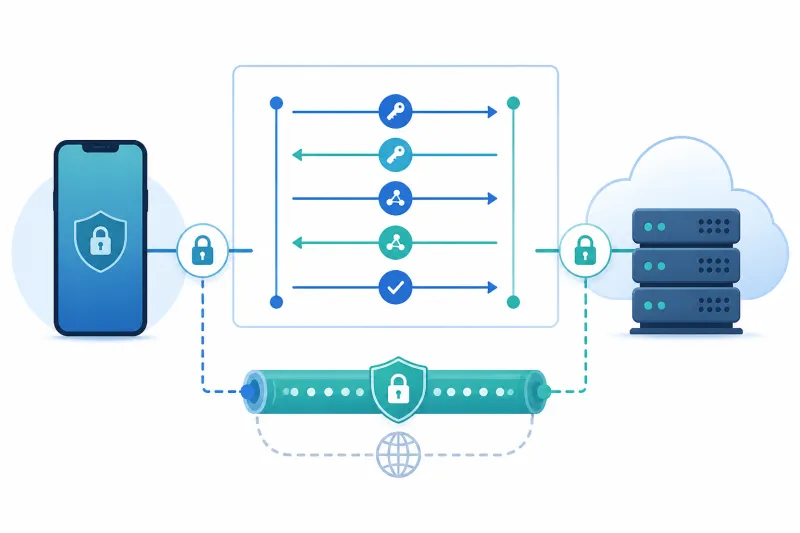
What is IKEv2?
Table of Contents
IKEv2 (Internet Key Exchange version 2) is the modern key-negotiation protocol most often paired with IPsec to build VPNs. In everyday speech people say “IKEv2 VPN” when they mean IKEv2 for control plane + ESP (Encapsulating Security Payload) for encrypted data. That pairing is what ships in many mobile OS VPN clients and in countless enterprise remote-access gateways.
If you manage Linux VPS hosts or evaluate VPN protocols for laptops and phones, IKEv2 shows up for a reason: it reconnects quickly after network changes, speaks a standards-based IPsec stack, and integrates with certificate or EAP-based identity systems that large organizations already understand.
This guide explains what IKEv2 is responsible for, how it relates to IPsec, where it shines for mobile users, and what you should plan before running it yourself.
What You'll Learn
- What IKEv2 does versus what IPsec ESP does
- How security associations, proposals, and identities fit together
- Why IKEv2 is popular for roaming clients
- A practical strongSwan-oriented sketch on Ubuntu
- Best practices and common deployment mistakes
- When IKEv2/IPsec is a better fit than WireGuard or OpenVPN
What IKEv2 Actually Is
IKEv2 is not the data tunnel by itself. It is the protocol that:
- Authenticates the two parties
- Negotiates cryptographic algorithms (within allowed proposals)
- Establishes IPsec Security Associations (SAs)
- Rekeys those SAs before they expire
- Can update endpoints when a client’s IP address changes (mobility)
Once SAs exist, ESP (or rarely AH) protects the actual IP packets. On Linux, that data path typically lives in the kernel’s XFRM/IPsec stack. Userspace daemons such as strongSwan or Libreswan speak IKEv2 and program the kernel policies.
This split matters operationally. Debugging “IKEv2 is up but traffic fails” often means the IKE SA negotiated successfully while ESP is blocked by a firewall, NAT, or missing traffic selectors.
Ports and NAT traversal
Classic IKE uses UDP 500. When NAT is detected, NAT-T moves IKE and ESP onto UDP 4500, encapsulating ESP so middleboxes that only understand UDP can forward it. Mobile clients behind carrier-grade NAT almost always need 4500/udp open on your VPS and cloud firewall.
If you allow UDP 500 but forget 4500, you will see handshakes die the moment NAT-T engages—an extremely common first-deploy failure.
Traffic selectors (what is tunneled)
IPsec policies define which packets belong in the tunnel (traffic selectors / child SA selectors). Narrow selectors create split tunnels (only certain prefixes). Wide selectors (0.0.0.0/0) create full-tunnel remote access. Get selectors wrong and you get “connected but nothing routes,” same class of pain WireGuard operators know from AllowedIPs.
Authentication Models
IKEv2 supports several authentication methods. The ones you will actually deploy:
Mutual certificate authentication. Server and client each have certificates from a trusted CA. Clean for device identity; fits MDM-issued machine certs.
Server certificate + EAP for users. The gateway proves itself with a cert; users authenticate with EAP methods (for example EAP-MSCHAPv2 with a username/password backend). Common in enterprise remote access—also a frequent source of weak password problems if MFA is absent.
Pre-shared keys (PSK). Simple for lab site-to-site links. Painful to rotate at scale and dangerous if the same PSK is reused broadly. Prefer certificates for anything beyond a tightly controlled pair of gateways.
Pick one primary model and document it. Mixing ad-hoc PSKs “just for one contractor” becomes permanent.
Why Mobile Clients Like IKEv2
Phones change networks constantly: Wi-Fi to LTE to another Wi-Fi. IKEv2’s mobility and multihoming extensions (often discussed alongside MOBIKE) allow the VPN to update network paths without a full user-visible reconnect in many cases.
Native or well-integrated IKEv2 clients on major mobile platforms lowered the friction further. That ecosystem effect—not marketing—is why “IKEv2” became shorthand for a smooth phone VPN experience in enterprise catalogs.
Desktop Linux and BSD are fully capable too; the UX story historically lagged phones, which is why some self-hosters standardized on WireGuard apps instead. Capability and convenience are different axes.
IKEv2 Compared With Other Options
| Concern | IKEv2/IPsec | WireGuard | OpenVPN |
|---|---|---|---|
| Standards posture | IETF IPsec family | Distinct protocol | Custom TLS-VPN design |
| Data path on Linux | Kernel IPsec | Kernel WireGuard | Userspace common |
| Transport | UDP 500/4500 | UDP | UDP or TCP |
| Cipher negotiation | Proposals | Fixed suite | Configurable TLS/data |
| Mobility | Strong | Strong | Good with tuning |
| Config complexity | Medium–high | Low | Medium–high |
Negotiation is a double-edged sword. Proposals let diverse implementations interoperate—and they create room for accidental weak choices if you allow outdated algorithms. Pin a modern proposal set; do not “accept everything” on internet-facing gateways.
A Practical Sketch With strongSwan (Ubuntu)
Exact package names and config layouts vary by release. The following illustrates the moving parts; adapt to your Ubuntu version’s strongSwan packaging (swanctl vs legacy ipsec.conf).
1. Install and enable forwarding
sudo apt update
sudo apt install -y strongswan strongswan-pki
echo 'net.ipv4.ip_forward=1' | sudo tee /etc/sysctl.d/99-ipsec.conf
sudo sysctl --system
2. Issue certificates
Create a CA, a server certificate with the correct SAN (DNS name clients will validate), and per-client certificates. Install the CA on clients as a trusted anchor for the VPN profile.
Subject Alternative Names matter. If the certificate CN/SAN does not match what the client is configured to expect, IKEv2 authentication fails in opaque ways.
3. Define a connection
Conceptually you need:
- Local identity (server FQDN) and private key
- Remote identity pattern for clients
- IKE proposal (for example AES-GCM or ChaCha20-Poly1305 with modern DH groups / Curve25519 where supported)
- ESP proposal aligned with IKE
- Virtual IP pool for remote-access clients (
rightsourceip/ pools in swanctl) - Optional split-tunnel networks pushed to clients
Example shape with classic ipsec.conf style (illustrative):
conn ikev2-remote
    auto=add
    compress=no
    type=tunnel
    keyexchange=ikev2
    fragmentation=yes
    forceencaps=yes
    ike=aes256gcm16-prfsha256-ecp256!
    esp=aes256gcm16-ecp256!
    left=%any
    [email protected]
    leftcert=server-cert.pem
    leftsendcert=always
    leftsubnet=0.0.0.0/0
    right=%any
    rightid=%any
    rightauth=pubkey
    rightsourceip=10.10.10.0/24
    rightdns=1.1.1.1
Prefer swanctl.conf on newer installs; the ideas are the same: identities, proposals, pools, and children SAs.
4. Open firewalls
sudo ufw allow 500/udp
sudo ufw allow 4500/udp
sudo ufw reload
Mirror the same rules on your DigitalOcean cloud firewall if you use one. ESP protocol 50 is often unnecessary when NAT-T encapsulates ESP in UDP 4500—but understand your path before deleting rules blindly on non-NATed site-to-site links.
5. Verify
sudo ipsec statusall
# or: sudo swanctl --list-sas
From a client, confirm the IKE SA, child SA, assigned virtual IP, and that traffic selectors match your intent. Ping tests only prove ICMP policy; test the real TCP/UDP applications too.
Site-to-Site Versus Remote Access
IKEv2/IPsec handles both patterns:
Remote access: gateway issues virtual IPs; laptops/phones initiate outbound; policies cover internet egress and/or private subnets.
Site-to-site: two gateways with stable identities tunnel specific prefixes between offices or VPCs. Often PSK or mutual certs; routing on each LAN must point toward the gateway for remote prefixes.
Do not overload one poorly documented connection profile for both audiences. Separate connections with clear names and monitoring.
Best Practices
-
Pin modern proposals; disable broken legacy algorithms. Explicit allow-lists beat “default include ancient for compatibility.”
-
Always open UDP 4500 for internet clients. Assume NAT-T.
-
Put the VPN hostname in the certificate SAN. Align client “server ID” settings with that name.
-
Prefer per-device certificates for high assurance. If you use EAP passwords, require MFA at the identity provider.
-
Log SA establishment and failures centrally. IKE failures are otherwise intermittent user tickets with no trail.
-
Plan rekey and DPD (dead peer detection). Mobiles sleep; networks drop. Tune without flapping.
-
Keep kernel and strongSwan/Libreswan patched. IPsec stacks are privileged code paths.
-
Document traffic selectors as carefully as firewall rules. They are a security boundary.
Common Mistakes
Allowing UDP 500 only. NAT-T breaks; phones on cellular fail.
Certificate hostname mismatches. Client config says vpn.example.com but cert SAN is only the droplet IP.
Overly broad proposals. Interoperability theater that permits weak crypto.
Forgetting IP forwarding and NAT on full-tunnel remote access. Same class of bug as OpenVPN/WireGuard full-tunnel misconfig.
Using one PSK for dozens of partners. Compromise anywhere compromises everywhere.
Confusing “IKE is established” with “applications work.” Debug child SA selectors, routing, and host firewalls next.
Ignoring fragmentation. Large certificates and proposals can require IKE fragmentation; enable it when clients fail during auth with cryptic errors.
Running site-to-site with overlapping LAN CIDRs. 10.0.0.0/24 on both sides guarantees pain. Renumber or use unique overlays.
FAQ
Is IKEv2 the same as IPsec?
No. IKEv2 negotiates and manages keys/SAs. IPsec (typically ESP) protects packets. People say “IKEv2 VPN” as shorthand for both.
Is IKEv2 secure?
With modern algorithms, authenticated identities, patched implementations, and tight selectors, yes it can be. Weak PSKs, outdated proposals, or exposed management planes undermine it quickly.
Does IKEv2 work behind NAT?
Yes—via NAT-T on UDP 4500. That is the normal case for home and mobile clients.
IKEv2 vs WireGuard—which should I use?
WireGuard is usually simpler to operate for self-hosted remote access on Linux with first-party apps. IKEv2/IPsec fits when you need native OS clients, existing IPsec policy tooling, or enterprise identity integrations already built around it.
Can IKEv2 run over TCP?
Standard IKEv2/IPsec for remote access is UDP-based (500/4500). TCP encapsulation exists in some products and drafts but is not what most self-hosted Linux guides mean. If you must have TCP traversal, OpenVPN or a different architecture may fit better.
What is MOBIKE?
An extension that helps IKEv2 sessions survive endpoint address changes—important for mobile roaming.
Do I need a public IP on the client?
No. Clients typically initiate outbound to your VPS. The server needs a stable public endpoint clients can reach.
How do I revoke access?
Revoke or remove the client certificate / disable the AAA account, ensure CRLs or OCSP are honored if applicable, and drop any still-listed SAs. For PSK site-to-site, rotate the secret and update both gateways.
Why does Windows or iOS fail while Linux works?
Usually proposal mismatch, certificate trust/SAN issues, or EAP settings. Capture server logs during a failed attempt; guess less.
Is IKEv2 good for site-to-site cloud links?
Yes—it is a traditional choice between firewalls and routers. On cloud VPS hosts, WireGuard is often faster to automate; IPsec remains appropriate when the other side’s hardware only speaks IPsec.
Summary
IKEv2 is the key-exchange protocol that sets up and maintains IPsec security associations. Together with ESP, it delivers standards-based VPNs with strong mobility characteristics and wide enterprise client support. On a VPS you will run a userspace IKE daemon, open UDP 500/4500, pin modern crypto proposals, and treat traffic selectors as carefully as firewall rules.
If you remember only a few points:
- IKEv2 ≠ the data plane; ESP carries the packets
- NAT-T on UDP 4500 is mandatory for most internet clients
- Certificates and SANs must match client expectations
- Pin strong proposals; do not allow legacy suites “just in case”
- Verify child SAs and routing, not only IKE status
Choose IKEv2/IPsec when standards interoperability or native mobile/enterprise clients dominate. Choose simpler stacks when you control both ends and want minimal configuration surface.
If you want to automate VPN server deployment instead of configuring everything manually, TunnelFleet helps you provision and manage VPN infrastructure on your own cloud provider with minimal manual setup.
Share this article
Practical guides on VPN infrastructure, server automation, and self-hosted networking from the TunnelFleet team.
View all articles by TunnelFleet Editorial →