Automating Server Provisioning
Table of Contents
Server provisioning is the path from “I need a VPN endpoint in Frankfurt” to “a healthy droplet is reachable, hardened, and ready to accept peers.” Done manually, it is a checklist you will eventually skip under pressure. Done well, it is a pipeline: create compute, bootstrap the OS, enroll management, verify health, publish DNS, and record inventory.
This guide walks through automating that pipeline for self-hosted VPN servers on DigitalOcean—the cloud provider TunnelFleet supports today—with patterns you can adapt to scripts, Terraform, or a productized control plane.
What You'll Learn
- The stages of a provisioning pipeline for VPN nodes
- How to automate create, bootstrap, enroll, verify, and destroy
- Identity, secrets, and firewall sequencing that avoids lockouts
- Post-boot verification you should never skip
- Scaling from one region to many without copy-paste
- Best practices, common mistakes, and FAQ
What “Provisioned” Means for a VPN Server
A droplet that merely boots is not provisioned. For VPN work, done means:
- Compute exists in the correct region with the correct size
- Network identity is stable (public IP and/or reserved IP, DNS name)
- OS users and SSH policy match your access standard
- Host and cloud firewalls allow SSH (as needed) and VPN ports
- VPN packages/agents are installed and services enabled
- The node is registered in inventory with role, CIDR, and owner
- Health checks pass (agent heartbeat, interface up, or handshake probe)
If step 6 is missing, you have a shadow server. If step 7 is missing, you have hope.
Stage 1: Declare Inputs
Automation starts with a schema, not a script:
region(for examplefra1)size(CPU/RAM for expected peer count and throughput)image(Ubuntu 22.04 or 24.04 LTS)role(vpn)hostname/ DNS labeltunnel_cidr(non-overlapping)vpn_listen_portssh_keysor enrollment tokentags(env:prod,role:vpn)
Reject creates that omit CIDR or collide with the registry. Early validation is cheaper than routing incidents.
Stage 2: Create Cloud Resources
Using the DigitalOcean API (directly, via Terraform, or via TunnelFleet):
- Create droplet with user data (cloud-init)
- Attach to VPC if private networking is required
- Assign reserved IP if the VPN endpoint must not change on rebuild
- Apply cloud firewall rules/tags for ports 22/tcp (if used) and VPN UDP/TCP
- Create or update DNS records when the IP is known
Prefer tag-based firewalls so new VPN droplets inherit policy without editing rules per IP.
Stage 3: Bootstrap with cloud-init
User data should:
- Create the admin user and authorized keys (or prepare agent-only access)
- Install WireGuard and/or OpenVPN packages as required by role
- Enable IP forwarding sysctl
- Configure UFW safely (allow SSH before enable)
- Install and start the management agent
- Write hostname and banner/motd identifying the role
Keep secrets out of git. Inject tokens at create time from a vault or provisioner.
Stage 4: Enroll and Configure VPN
After the agent can phone home:
- Register node ID, public IP, region, and capabilities
- Generate or install server keys without exposing private material in logs
- Apply protocol enablement (WireGuard, OpenVPN UDP/TCP) as deliberate actions
- Allocate the server’s tunnel address from
tunnel_cidr - Confirm
wg show/ service status via the agent
This is where productized flows beat bespoke SSH: enrollment is an API state transition, not a tribal runbook.
Stage 5: Verify Before You Hand Out Configs
Automated verification checklist:
cloud-init status --wait
systemctl is-active <agent>
ip -br a
ss -ulnp | grep 51820   # example WireGuard port
sudo ufw status
sudo wg show
From outside:
- TCP/UDP reachability probes to allowed ports only
- DNS resolves to the intended address
- Monitoring target is scraped or heartbeat is fresh
Gate “ready” on these checks. Do not email client configs against a node that failed cloud-init.
Stage 6: Publish Access
Only after ready:
- Create VPN users/peers with ownership metadata
- Distribute client configs through a secure channel
- Document the endpoint hostname—not a raw IP that will change
Stage 7: Destroy Is Part of Provisioning
Deprovisioning must:
- Disable or delete peers pointing at the node
- Remove DNS
- Delete or retarget alerts
- Destroy droplet and release reserved IP intentionally
- Mark inventory
destroyedwith timestamp
Orphan DNS and live peers to a dead IP are classic post-mortem findings.
Sequencing: Avoid Lockout and Race Conditions
Order matters:
- Cloud firewall must allow bootstrap access before you rely on SSH troubleshooting—or skip human SSH entirely and use console + agent.
- Do not enable UFW deny-all before SSH allow rules exist in the same boot.
- Do not announce DNS before the node is ready (or use a low TTL during rollout).
- Do not allocate overlapping CIDRs in parallel creates—serialize CIDR assignment or use a central allocator with locks.
Secrets and Identity
Provisioning credentials (DigitalOcean token, agent bootstrap token) are production-powerful. Practices:
- Short-lived tokens where possible
- Separate tokens per environment
- No tokens in shell history on laptops—use CI OIDC or a secret manager
- Rotate bootstrap tokens on a schedule
Server VPN keys should be generated in a controlled boundary (HSM optional; filesystem 0600 minimum) and never printed in full in CI logs.
Multi-Region Automation
Templatize by role; parameterize by region:
- Same cloud-init role template
- Different
tunnel_cidrand hostname - Region-specific sizes only when traffic patterns differ
- Global registry preventing CIDR overlap
Promote template changes via canary region first.
Human Escape Hatches
Automation fails. Keep:
- DigitalOcean recovery console access procedures
- Break-glass SSH keys stored offline
- A documented “isolate node” step (firewall deny, revoke peers) for compromise
Escape hatches that bypass inventory forever become shadow IT—time-box them.
Idempotency and Create Tokens
Cloud APIs retry. Your provisioner will too. Without idempotency keys or deterministic names, a timeout can create two droplets for one request.
Patterns that work:
- Client-generated request ID stored before the API call; on retry, return the existing droplet
- Deterministic hostname reservation in inventory before create; refuse duplicates
- Tag droplets with
provision_request_id=...and search before create
Bill for one VPN node per intent—not for your HTTP client’s anxiety.
Readiness Contracts
Expose a machine-readable ready signal:
{"status":"ready","agent":"ok","wireguard":"ok","hostname":"vpn-fra-01"}
CI, DNS automation, and peer issuance should wait on that contract. Human eyeballing ssh and wg show does not scale and does not belong in the critical path once automation exists.
Rollback of a Bad Template
When a bad cloud-init ships:
- Halt the rollout queue
- Pin the previous template version
- Replace canary/bad nodes (do not try to surgically untangle half-applied user data)
- Add a regression assertion to the canary suite for the failure mode
Provisioning automation without rollback discipline just automates outages.
Parallelism Limits
Provisioning fifty VPN nodes at once can trip API rate limits, exhaust IP quotas, or overwhelm your enrollment service. Use a queue with concurrency caps per region. Prefer steady convergence over a thundering herd after a template change.
Backpressure signals: DigitalOcean 429s, agent enrollment latency, DNS provider rate limits. Record them; tune concurrency with evidence.
Naming Reservations and DNS Timing
Reserve the hostname in inventory first, create the droplet second, point DNS third (or update when reserved IP attaches). If DNS flips before ready, clients cache failure. Low TTLs help during migration; raise TTLs after the endpoint is stable to reduce lookup chatter.
Document whether the public hostname is the reserved IP (stable across rebuilds) or the ephemeral droplet IP (changes every replace). That choice drives client support load.
Observability From the First Minute
Emit structured events for each stage: provision.started, droplet.created, cloud_init.finished, agent.enrolled, health.passed, dns.published, provision.failed. Include request_id, region, and droplet id. With those events you can build an SLO for “time to ready” and see which stage regresses after a template change.
Without stage events, a twenty-minute provision looks the same as a two-minute one until users complain. Dashboards beat anecdotes.
Also capture failure reasons as enums (api_rate_limit, cloud_init_error, agent_timeout) rather than free-text only—free-text is for details, enums are for paging and trends.
Best Practices
- Schema-first creates with validation.
- Reserved IPs for customer-facing VPN DNS names when rebuilds are common.
- Health-gated readiness before peer issuance.
- Idempotent create APIs—retries should not spawn duplicate droplets blindly (use client tokens / names).
- Observability from minute zero—ship logs/metrics as part of bootstrap.
- Ubuntu LTS only for supported VPN roles (22.04/24.04).
- Record who provisioned what (actor, PR, or automation ID).
- Test destroy path as often as create path.
Common Mistakes
Click-ops exceptions “just this once.” They become permanent.
Provisioning without a CIDR registry. Overlaps appear weeks later.
Relying only on host UFW and forgetting DigitalOcean cloud firewall—or the reverse.
Printing private keys in cloud-init output logs.
No readiness gate—support distributes configs to half-installed nodes.
Long-lived DO tokens on laptops shared across the team.
Hostname collisions across environments (vpn-1 in staging and prod).
Skipping destroy cleanup for DNS and monitoring.
FAQ
Do I need Kubernetes to automate VPN provisioning?
No. VPN nodes are usually individual VPS instances. Orchestrate with API + cloud-init + agent; do not force tunnels into a container platform unless that is already your standard and you accept the networking complexity.
How long should provisioning take?
For a lean WireGuard role on DigitalOcean, minutes—not hours. If bootstrap takes thirty minutes of apt, bake an image.
Should every VPN server allow SSH?
Not necessarily. Some fleets use agent + provider console only. If you keep SSH, restrict source IPs or require a jump host.
What size droplet should I pick?
Start from concurrent throughput and peer count, not marketing. CPU matters for high packet rates; disk rarely does for pure VPN. Re-test after real load.
Can I re-run provisioning against an existing droplet?
Prefer replace for bootstrap role changes. Mutating live nodes casually recreates snowflakes. Peer changes should go through reconcile, not full reprovision.
How does TunnelFleet fit?
TunnelFleet automates DigitalOcean droplet provisioning and agent installation so you spend less time in manual setup, then manages protocols and VPN users from the control plane.
What about OpenVPN provisioning?
Same pipeline; add PKI issuance steps and certificate distribution. Automate CRL/OCSP publishing if you rely on cert expiry for revoke—or revoke in inventory and push config removal.
Summary
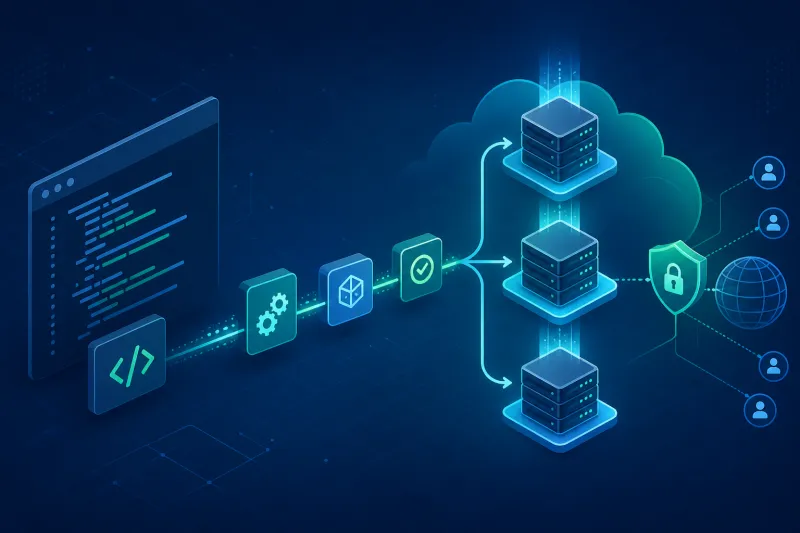
Automating server provisioning is a staged pipeline: inputs, cloud create, cloud-init bootstrap, enrollment, verification, access publication, and clean destroy. VPN-specific risk concentrates in CIDR allocation, firewall sequencing, and secrets exposure. Codify those, gate readiness, and keep peer management off the hot path of droplet create.
If you want to automate VPN server deployment instead of configuring everything manually, TunnelFleet helps you provision and manage VPN infrastructure on your own cloud provider with minimal manual setup.
Share this article
Practical guides on VPN infrastructure, server automation, and self-hosted networking from the TunnelFleet team.
View all articles by TunnelFleet Editorial →